Creating a client/partner portal that enables you to share your Airtable data with external users is one of the most common usages of Softr.You can do so in a secure way that enables you to restrict who has access to your Airtable information. This way you won’t need to share your Airtable base with your external users.
In addition, you’re going to be able to customize your user’s experience by offering them an intuitive user interface similar to the web applications they are used to and tailored to your brand and your way of working.
1. Getting started with the client portal template
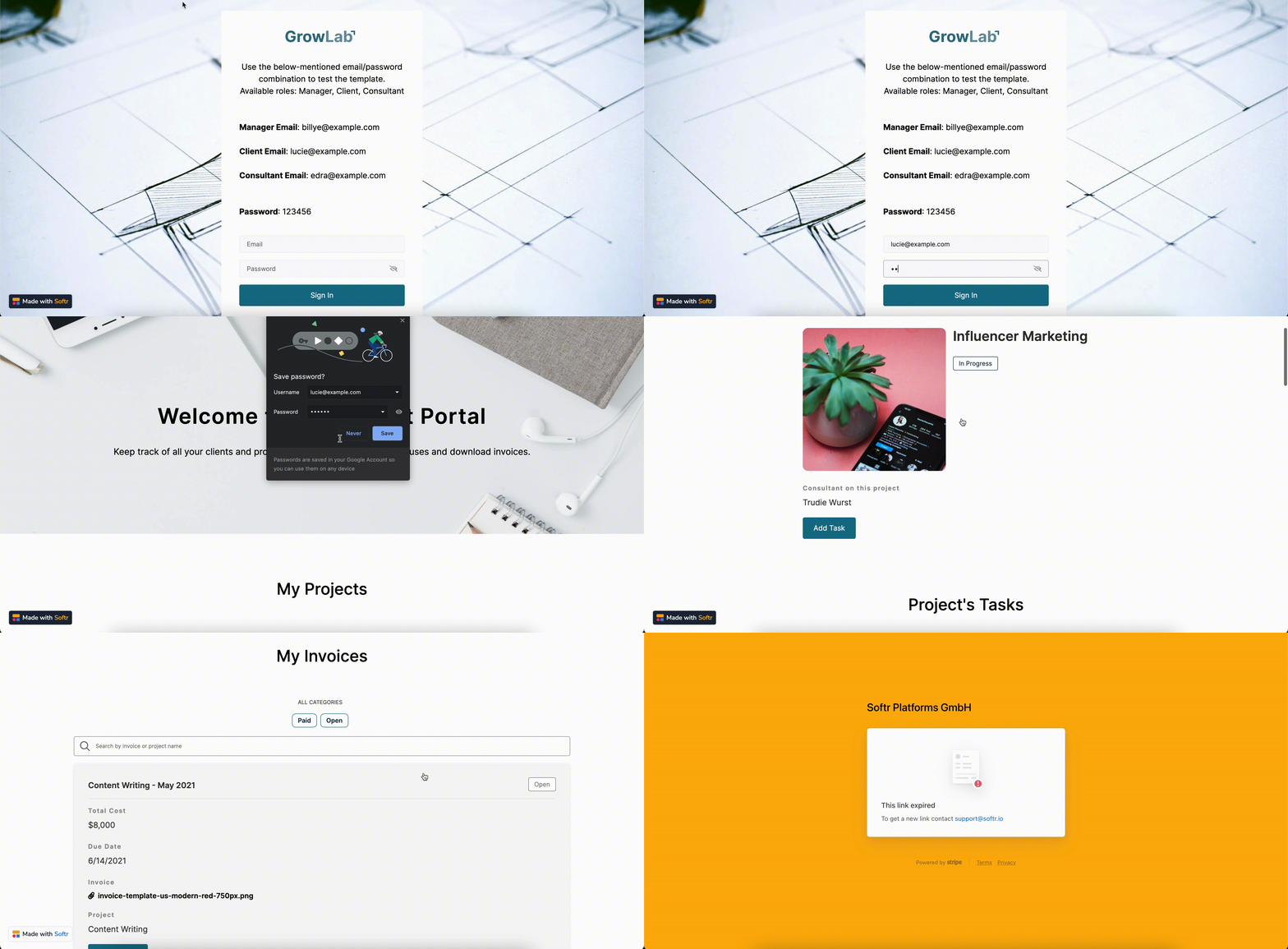
The Client Portal template is a powerful agency web app template that enables clients and customers to collaborate on ongoing projects:Consultants and Managers will be able to keep track of their clients, projects, tasks, and payments in one place. In addition, they will have access to a list of team members and their contact information.Clients will be able to see their own projects, tasks, and invoices. They can add new tasks to the projects and pay past-due invoices.You can find detailed instructions on creating a Softr app from a template here. Just search for “client portal” and select the template. However, before we create an app from a template and start customizing it, let’s Preview the template to explore its features. There are three user groups available by default. If we, for instance, log in with a Client Email, we’ll see that clients have access to all of their projects and tasks and can also manage and pay their invoices (using the Stripe integration).
Logging in as a client
Further on, if we log in as a Consultant, we’ll have access to some additional sections such as company clients (along with all the projects assigned to them). Moreover, they can add tasks to clients’ projects. Thus, consultants can access the information of all the customers, while clients only see the info that’s specific to their projects.
One of the easiest ways to start creating your client portal is to use the Client Portal template. The process is pretty straightforward, so let’s take a quick look at the steps involved.
1
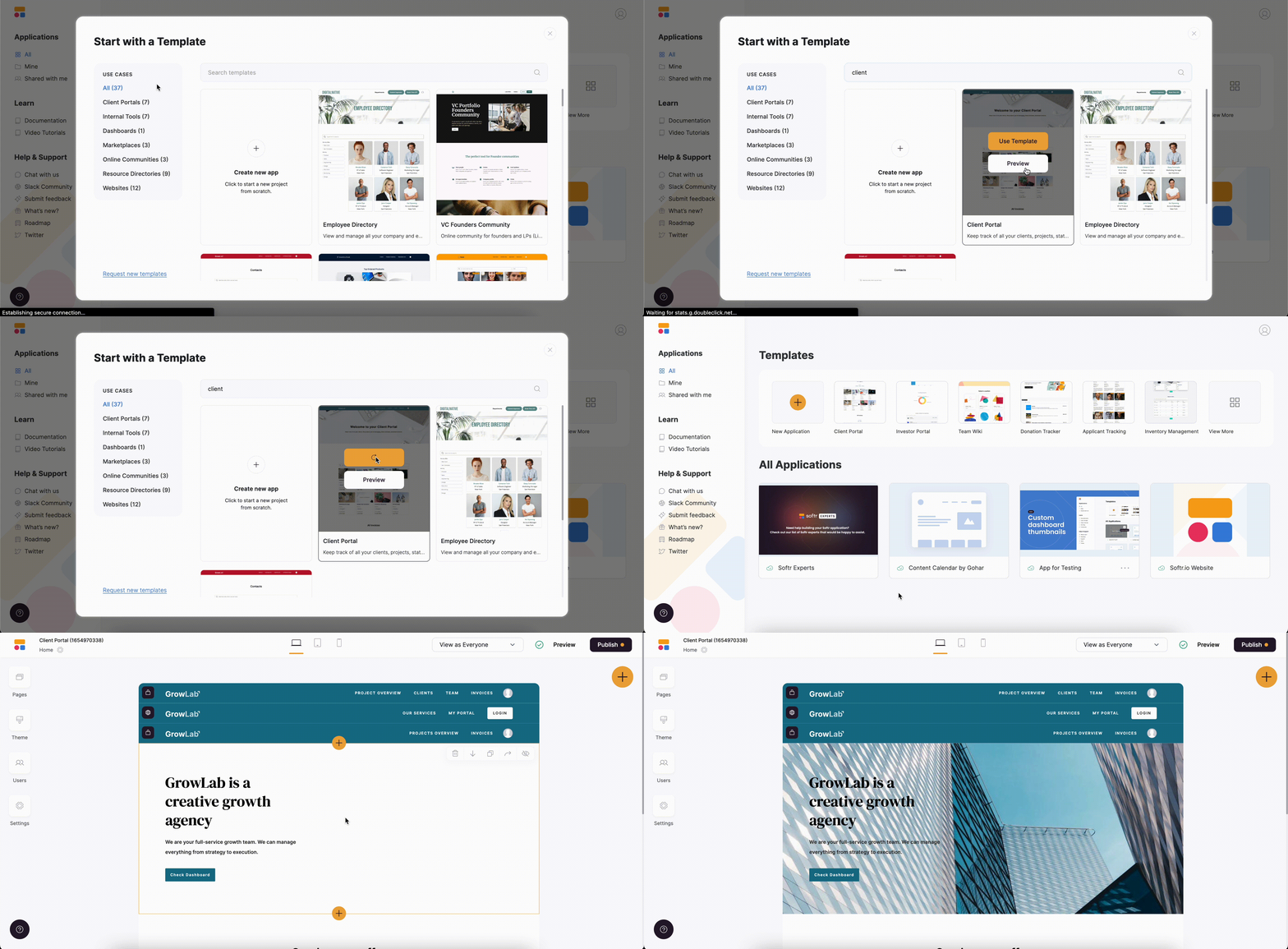
Create an app from a template
To use the template, you just need to find the required template and hit Use Template. As soon as you do that, you’ll be immediately taken to your new Softr app with the template applied. You can connect your database during the setup or later on, so we’ll look into that in the next step.
Creating a Client Portal from a template
2
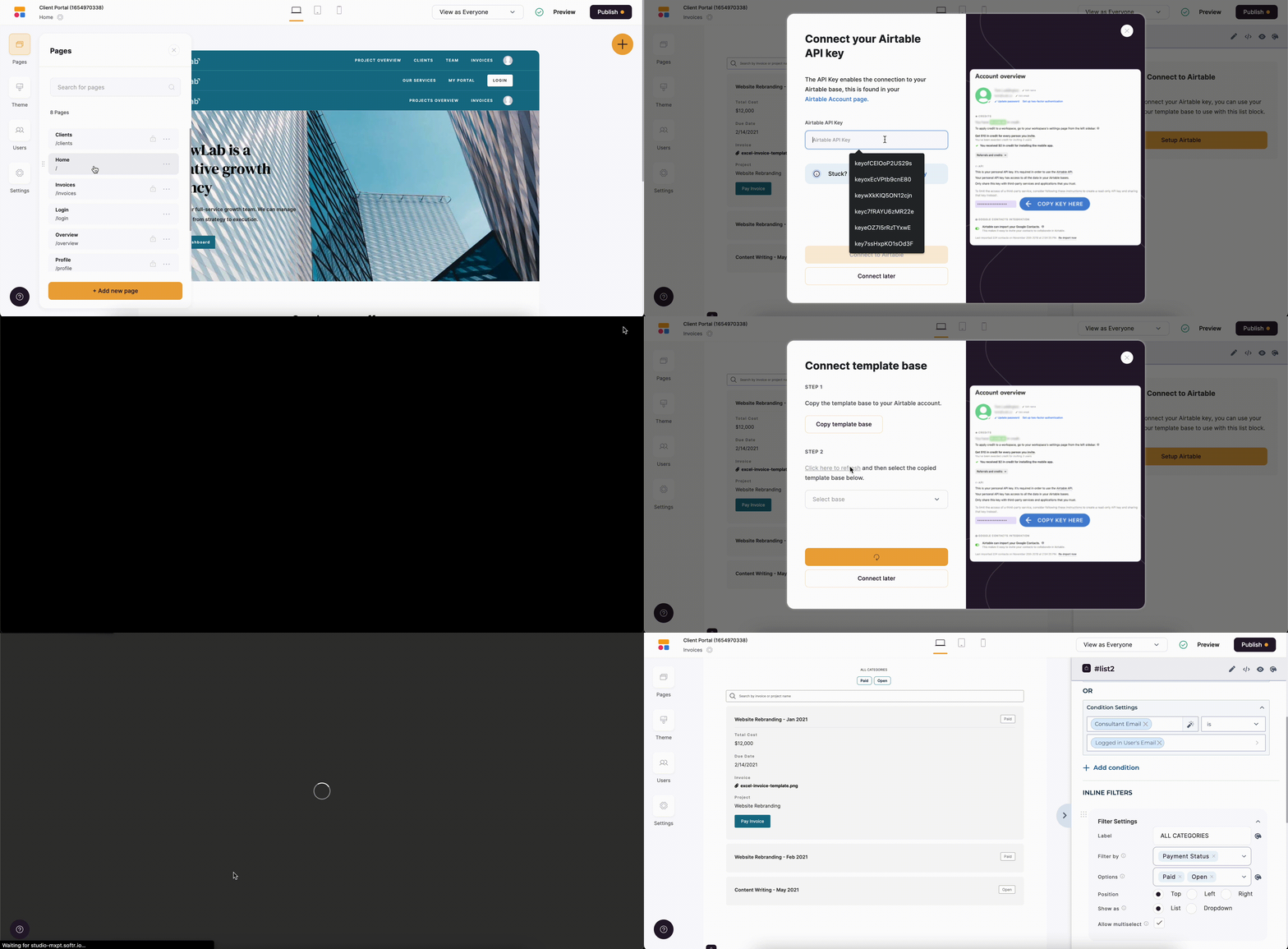
Connecting Airtable base
Now you need to connect the template’s Airtable base with all the mock data, which you can modify later on. To do that, you can either go to Integrations => Airtable or just click on one of the dynamic blocks that is linked to Airtable.
Connecting the app to Airtable
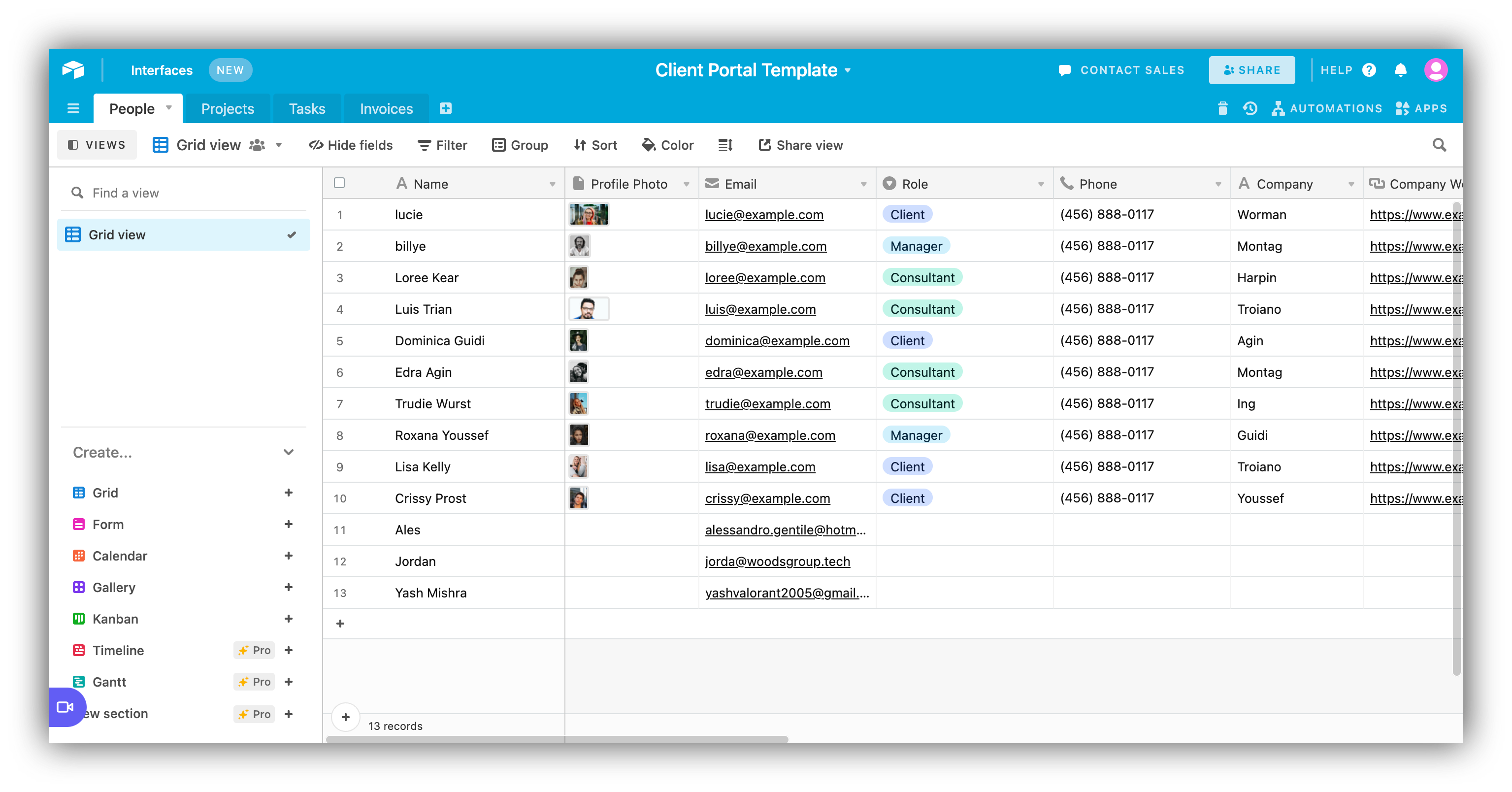
As you can see, we now have all the data such as Clients, Projects, Tasks, Invoices, etc. in our Airtable base.
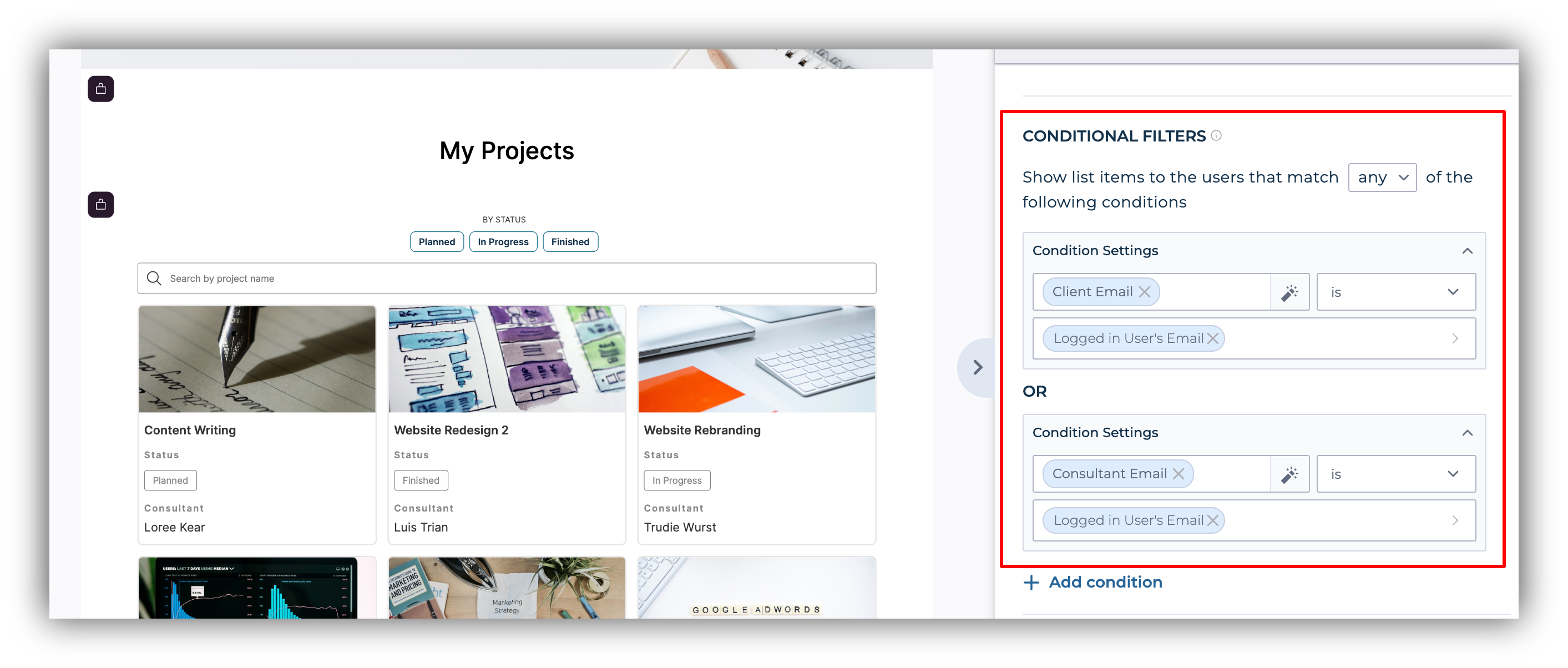
Softr makes it extremely easy to share data with your clients in a secure and user-friendly way. To do so, simply use one of the available blocks (for example, List or List Details), connect it to Airtable, and you will be good to go. As we discussed earlier, each user group sees only the blocks and pages that are relevant to them. This is achieved through conditional filters that can be applied to dynamic blocks (that fetch data from Airtable) to filter the list differently for each user.
Conditional filters applied on the list of projects
In the image above, you can see that the conditional filter applied on the list of projects allows the logged-in user to see only the projects that are assigned to him/her. This way, clients, for instance, will be able to view only those projects that contain their email under Client Email, where Client Email is a field in the template Airtable data source.
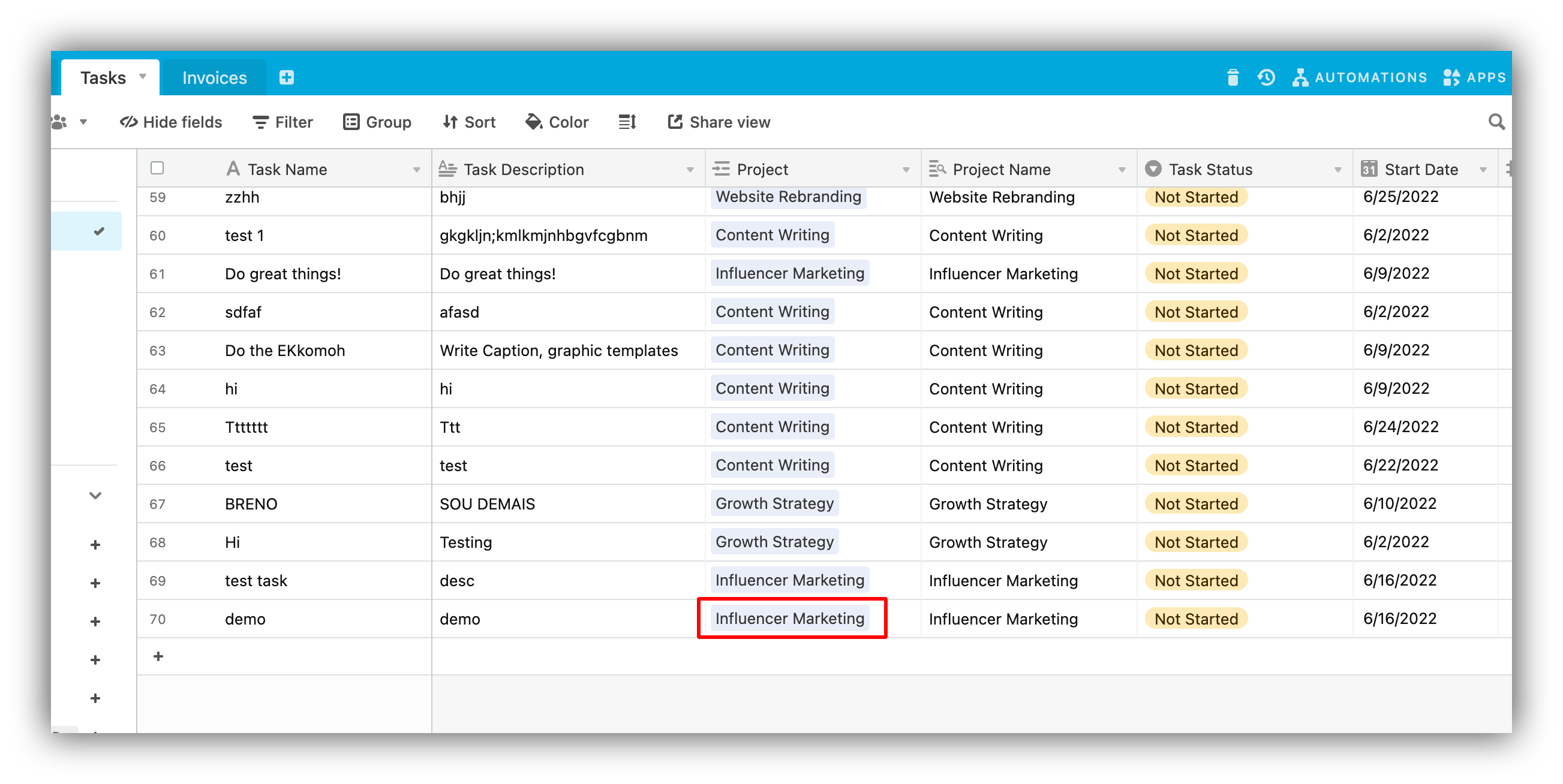
Allowing your clients or team to add data as part of their collaboration workflows is essential in almost all client portals. The Client Portal template allows clients to add new tasks to their running projects using a simple form. Below, you can see how the client logs in and submits a task using the form, which is then stored on Airtable.To store the form submission on Airtable, you just need to connect it to the corresponding table through form settings as well as map all the fields. Moreover, as you can see below, the task is automatically assigned to the project it was submitted for.
Task assigned to a project
This is done through a form hidden field, which grabs the record ID from the project URL. The ID differs depending on which project (i.e. record) is opened in the project details block at a given time.
In some cases, you may want your clients and team to edit information. With Softr, you can enable them to do that without having to share the entire Airtable base and, if needed, be very specific about who can edit what.
Since the client portal implies a selected group of users without a public signup page, you’ll most probably be adding users through one of the ways described here. You can find more details on the other aspects of memberships in our detailed guide.
Restricting access to pages and data based on user roles
Each block or page in your Softr app can have its own visibility rules that specify who can access it. Our visibility settings overview will help you understand how this works.
Brand your portal to match your, or your client’s, website
Softr provides a variety of options for customizing the look and feel of your app. You can configure your app’s theme in general as well as apply more granular stylings for each block.
Personalize the app by adding the user’s name to text fields
Finally, you create a more personalized experience for your app users by adding this specific variable {LOGGED_IN_USER:NAME} in any static text field to show the logged-in user name.
Was this page helpful?
{"docsConfig":{"theme":"aspen","$schema":"https://mintlify.com/docs.json","name":"Softr Documentation","colors":{"primary":"#386AF5","light":"#fff","dark":"#030712"},"logo":{"light":"https://mintcdn.com/softr-2b8a27e1/HXG2UYaIUrK-BV-R/logo/dark.svg?fit=max\u0026auto=format\u0026n=HXG2UYaIUrK-BV-R\u0026q=85\u0026s=5c6f3b3fe9daa5c70059c7eb3389cd06","dark":"https://mintcdn.com/softr-2b8a27e1/HXG2UYaIUrK-BV-R/logo/light.svg?fit=max\u0026auto=format\u0026n=HXG2UYaIUrK-BV-R\u0026q=85\u0026s=43609f734df1691b8a6e227776643a0f"},"favicon":"https://mintcdn.com/softr-2b8a27e1/HXG2UYaIUrK-BV-R/logo-light.svg?fit=max\u0026auto=format\u0026n=HXG2UYaIUrK-BV-R\u0026q=85\u0026s=21111872c2f4d5c53e6924606a78a163","appearance":{"default":"light"},"background":{"color":{"dark":"#111827"}},"navbar":{"links":[{"href":"https://community.softr.io/","label":"Community"},{"href":"https://www.softr.io/partners?from=docs","label":"Hire an Expert"}],"primary":{"type":"button","label":"Sign Up","href":"https://studio.softr.io/auth/signin"}},"footer":{"links":[{"header":" ","items":[{"label":"Sign Up","href":"https://studio.softr.io/auth/signin"},{"label":"Hire an Expert","href":"https://www.softr.io/partners?from=docs"},{"label":"Blog","href":"https://www.softr.io/blog"},{"label":"Follow Us","href":"https://www.linkedin.com/company/softr"},{"label":"Contact Us","href":"mailto:support@softr.io"}]}]},"fonts":{"heading":{"family":"Inter"},"body":{"family":"Inter"}},"contextual":{"options":["copy","view","chatgpt","claude","perplexity"],"display":"header"},"styling":{"latex":false},"navigation":{"pages":[]}},"deployment":{"deploymentMetadataValue":{"subdomain":"softr-2b8a27e1","hasAudioNarration":false,"actualSubdomain":"softr-2b8a27e1","customDomains":["docs.softr.io"],"gitSource":{"type":"github","owner":"softr-io","repo":"softr-public-documentation","deployBranch":"main","contentDirectory":"","isPrivate":true,"mountPath":"","label":""},"chroma":{"liveDeploymentHistoryId":"6adb157b7ebcfcb7ce7748ae","collectionId":"cf6b6a92-d36e-49d7-9144-e1004e459d1d","schemaVersion":"v3","latestBuiltDeploymentHistoryId":"6adb157b7ebcfcb7ce7748ae"},"feedback":{"thumbs":true},"entitlements":{"AI_CHAT":{"status":"ENABLED"},"WEB_MCP":{"status":"ENABLED"},"NARRATION":{"status":"ENABLED"}},"buildId":"6adb157b7ebcfcb7ce7748ae","clientVersion":"0.0.3965","searchFilterCounts":[{"language":"default","tag":"Integrations","count":85},{"language":"default","tag":"Softr Workflows","count":62},{"language":"default","tag":"Building Blocks","count":50},{"language":"default","tag":"Softr API","count":27},{"language":"default","tag":"Softr Database API","count":24},{"language":"default","tag":"Add and Manage Users","count":20},{"language":"default","tag":"Data Sources","count":16},{"language":"default","tag":"How to Guides","count":14},{"language":"default","tag":"Actions","count":13},{"language":"default","tag":"Publishing","count":12}]},"assistantConfig":{},"hasChatPermissions":false,"hasWebMcpPermissions":true,"toggles":[{"name":"kill-isr","enabled":true,"variant":{"name":"disabled","enabled":false,"feature_enabled":true},"impressionData":false},{"name":"agent-mintlify-slack","enabled":true,"variant":{"name":"disabled","enabled":false,"feature_enabled":true},"impressionData":false},{"name":"editor-v7-file-tree","enabled":true,"variant":{"name":"disabled","enabled":false,"feature_enabled":true},"impressionData":false},{"name":"agent-integrations-settings","enabled":true,"variant":{"name":"disabled","enabled":false,"feature_enabled":true},"impressionData":false},{"name":"automations-pr-grouping","enabled":true,"variant":{"name":"disabled","enabled":false,"feature_enabled":true},"impressionData":false},{"name":"custom-prefix","enabled":true,"variant":{"name":"disabled","enabled":false,"feature_enabled":true},"impressionData":false},{"name":"analytics-v7","enabled":true,"variant":{"name":"disabled","enabled":false,"feature_enabled":true},"impressionData":false},{"name":"user-flows-analytics","enabled":true,"variant":{"name":"disabled","enabled":false,"feature_enabled":true},"impressionData":false},{"name":"no-publish-flow","enabled":true,"variant":{"name":"disabled","enabled":false,"feature_enabled":true},"impressionData":false},{"name":"workos-onboarding","enabled":true,"variant":{"name":"disabled","enabled":false,"feature_enabled":true},"impressionData":false},{"name":"llms-txt-v2","enabled":true,"variant":{"name":"disabled","enabled":false,"feature_enabled":true},"impressionData":false},{"name":"pause-universal-search-reconcile","enabled":true,"variant":{"name":"disabled","enabled":false,"feature_enabled":true},"impressionData":false},{"name":"snapshot-serving-live","enabled":true,"variant":{"name":"disabled","enabled":false,"feature_enabled":true},"impressionData":false},{"name":"stripTemperatureMiddleware","enabled":true,"variant":{"name":"disabled","enabled":false,"feature_enabled":true},"impressionData":false},{"name":"per-site-search-delta","enabled":true,"variant":{"name":"disabled","enabled":false,"feature_enabled":true},"impressionData":false},{"name":"support-platform-pylon-zendesk","enabled":true,"variant":{"name":"disabled","enabled":false,"feature_enabled":true},"impressionData":false},{"name":"snapshot-serving","enabled":true,"variant":{"name":"disabled","enabled":false,"feature_enabled":true},"impressionData":false},{"name":"instant-rollback","enabled":true,"variant":{"name":"disabled","enabled":false,"feature_enabled":true},"impressionData":false},{"name":"granular-notifications-server","enabled":true,"variant":{"name":"disabled","enabled":false,"feature_enabled":true},"impressionData":false},{"name":"granular-notifications","enabled":true,"variant":{"name":"disabled","enabled":false,"feature_enabled":true},"impressionData":false},{"name":"editor-private-page-search","enabled":true,"variant":{"name":"disabled","enabled":false,"feature_enabled":true},"impressionData":false},{"name":"automations-fable","enabled":true,"variant":{"name":"disabled","enabled":false,"feature_enabled":true},"impressionData":false},{"name":"fixed-ai-action-pricing","enabled":true,"variant":{"name":"disabled","enabled":false,"feature_enabled":true},"impressionData":false},{"name":"automation-resolve-merge-conflict","enabled":true,"variant":{"name":"disabled","enabled":false,"feature_enabled":true},"impressionData":false},{"name":"scoped-publishing","enabled":true,"variant":{"name":"disabled","enabled":false,"feature_enabled":true},"impressionData":false},{"name":"mintql","enabled":true,"variant":{"name":"disabled","enabled":false,"feature_enabled":true},"impressionData":false},{"name":"page-level-analytics","enabled":true,"variant":{"name":"disabled","enabled":false,"feature_enabled":true},"impressionData":false},{"name":"editor-version-history-v2","enabled":true,"variant":{"name":"disabled","enabled":false,"feature_enabled":true},"impressionData":false},{"name":"editor-nav-generations","enabled":true,"variant":{"name":"disabled","enabled":false,"feature_enabled":true},"impressionData":false},{"name":"billing-page-v2","enabled":true,"variant":{"name":"disabled","enabled":false,"feature_enabled":true},"impressionData":false},{"name":"workspace-projects","enabled":true,"variant":{"name":"disabled","enabled":false,"feature_enabled":true},"impressionData":false},{"name":"assistant-v5","enabled":true,"variant":{"name":"disabled","enabled":false,"feature_enabled":true},"impressionData":false},{"name":"byok-sep-25","enabled":true,"variant":{"name":"disabled","enabled":false,"feature_enabled":true},"impressionData":false},{"name":"fork-pr-previews","enabled":true,"variant":{"name":"disabled","enabled":false,"feature_enabled":true},"impressionData":false},{"name":"revalidation-jwt","enabled":true,"variant":{"name":"disabled","enabled":false,"feature_enabled":true},"impressionData":false},{"name":"vite-origin","enabled":true,"variant":{"name":"disabled","enabled":false,"feature_enabled":true},"impressionData":false},{"name":"editor-agent-model-picker","enabled":true,"variant":{"name":"disabled","enabled":false,"feature_enabled":true},"impressionData":false},{"name":"billing-updated-9-15","enabled":true,"variant":{"name":"disabled","enabled":false,"feature_enabled":true},"impressionData":false},{"name":"hobby-abuse-scan","enabled":true,"variant":{"name":"disabled","enabled":false,"feature_enabled":true},"impressionData":false},{"name":"dashboard-inbox","enabled":true,"variant":{"name":"disabled","enabled":false,"feature_enabled":true},"impressionData":false}],"isAtlas":false,"googleFontsInlined":false},"customCss":[{"filePath":"style.css","content":"ol ol{list-style-type:decimal!important}.dark .prose span :where(a):not(:where([class~=\"not-prose\"], [class~=\"not-prose\"] *)){border-bottom:1px solid #f9a619}.dark .prose span :where(a:hover):not(:where([class~=\"not-prose\"], [class~=\"not-prose\"] *)){border-bottom-width:2px}"}],"page":{"pagePath":"how-to-guides/how-to-create-a-client-portal","slug":"/how-to-guides/how-to-create-a-client-portal","pageMetadata":{"title":"How to Create a Client Portal?","permalink":"pnfkjmh2mr68N9WWRDEYKG","description":"Building client portals with Softr.","og:title":"How to Create a Client Portal? – Softr Help Docs","og:description":"Building client portals with Softr.","og:image":"https://res.cloudinary.com/helpkit/image/upload/c_scale,w_700,q_auto/v1674219840/softrdocs_meta_OG_Image_Url_258f31c013.png","twitter:title":"How to Create a Client Portal? – Softr Help Docs","twitter:description":"Building client portals with Softr.","href":"/how-to-guides/how-to-create-a-client-portal"},"description":{"compiledSource":"\"use strict\";\nconst {jsx: _jsx} = arguments[0];\nconst {useMDXComponents: _provideComponents} = arguments[0];\nfunction _createMdxContent(props) {\n const _components = {\n p: \"p\",\n ..._provideComponents(),\n ...props.components\n };\n return _jsx(_components.p, {\n children: \"Building client portals with Softr.\"\n });\n}\nfunction MDXContent(props = {}) {\n const {wrapper: MDXLayout} = {\n ..._provideComponents(),\n ...props.components\n };\n return MDXLayout ? _jsx(MDXLayout, {\n ...props,\n children: _jsx(_createMdxContent, {\n ...props\n })\n }) : _createMdxContent(props);\n}\nreturn {\n default: MDXContent\n};\n","frontmatter":{},"scope":{}},"pageType":"default","mdx":{"mdxSource":{"compiledSource":"\"use strict\";const{Fragment:_Fragment,jsx:_jsx,jsxs:_jsxs}=arguments[0];const{useMDXComponents:_provideComponents}=arguments[0];function _createMdxContent(props){const _components={a:`a`,code:`code`,p:`p`,strong:`strong`,..._provideComponents(),...props.components},{Frame,Heading,OptimizedImage,Step,Steps}=_components;if(!Frame)_missingMdxReference(`Frame`,true);if(!Heading)_missingMdxReference(`Heading`,true);if(!OptimizedImage)_missingMdxReference(`OptimizedImage`,true);if(!Step)_missingMdxReference(`Step`,true);if(!Steps)_missingMdxReference(`Steps`,true);return _jsxs(_Fragment,{children:[_jsx(_components.p,{children:`Creating a client/partner portal that enables you to share your Airtable data with external users is one of the most common usages of Softr.`}),`\n`,_jsx(_components.p,{children:`You can do so in a secure way that enables you to restrict who has access to your Airtable information. This way you won’t need to share your Airtable base with your external users.\nIn addition, you’re going to be able to customize your user’s experience by offering them an intuitive user interface similar to the web applications they are used to and tailored to your brand and your way of working.`}),`\n`,_jsx(Heading,{level:`2`,id:`1-getting-started-with-the-client-portal-template`,children:`1. Getting started with the client portal template`}),`\n`,_jsxs(_components.p,{children:[`The `,_jsx(_components.a,{href:`https://www.softr.io/templates/client-portal`,children:`Client Portal template`}),` is a powerful agency web app template that enables clients and customers to collaborate on ongoing projects:`]}),`\n`,_jsx(_components.p,{children:`Consultants and Managers will be able to keep track of their clients, projects, tasks, and payments in one place. In addition, they will have access to a list of team members and their contact information.`}),`\n`,_jsx(_components.p,{children:`Clients will be able to see their own projects, tasks, and invoices. They can add new tasks to the projects and pay past-due invoices.`}),`\n`,_jsxs(_components.p,{children:[`You can find detailed instructions on creating a Softr app from a template `,_jsx(_components.a,{href:`/5315870b0eb4473fb49dd13c97635d67#e71ed9b1e6a743999a2e741a11b9855f`,children:`here`}),`. Just search for “client portal” and select the template. However, before we create an app from a template and start customizing it, let’s `,_jsx(_components.strong,{children:`Preview`}),` the template to explore its features. There are three `,_jsx(_components.a,{href:`/user-groups-and-permissions/3oA6AaFzUiePs2sW2TpYrF/user-groups/6XQfKMeKHUvBcAjKvLs3g3`,children:`user groups`}),` available by default. If we, for instance, log in with a Client Email, we’ll see that clients have access to all of their projects and tasks and can also manage and pay their invoices (using the `,_jsx(_components.a,{href:`/integrations/etS18kJqm1fuD58KCsjC3z/stripe-checkout/iBomMEucRZtM2y6HuutYVC`,children:`Stripe integration`}),`).`]}),`\n`,_jsx(Frame,{caption:`Logging in as a client`,children:_jsx(OptimizedImage,{src:`https://mintcdn.com/softr-2b8a27e1/wZsu0rPwV3m7R1-j/how-to-guides/images/how-to-create-a-client-portal/image1.gif?s=f67c4efd2ef3bc7dbb7ec1385d612903`,alt:`Logging in as a client`,\"data-og-width\":`2880`,width:`2880`,\"data-og-height\":`1416`,height:`1416`,\"data-path\":`how-to-guides/images/how-to-create-a-client-portal/image1.gif`,\"data-optimize\":`true`,\"data-opv\":`3`})}),`\n`,_jsxs(_components.p,{children:[`Further on, if we log in as a `,_jsx(_components.strong,{children:`Consultant,`}),` we’ll have access to some additional sections such as company clients (along with all the projects assigned to them). Moreover, they can add tasks to clients’ projects. Thus, consultants can access the information of all the customers, while clients only see the info that’s specific to their projects.`]}),`\n`,_jsx(Frame,{caption:`Logging in as a Consultant`,children:_jsx(OptimizedImage,{src:`https://mintlify.s3.us-west-1.amazonaws.com/softr-2b8a27e1/how-to-guides/images/how-to-create-a-client-portal/image2.gif`,alt:`Logging in as a Consultant`})}),`\n`,_jsx(Heading,{level:`2`,id:`2-create-your-client-portal`,children:`2. Create your client portal`}),`\n`,_jsx(_components.p,{children:`One of the easiest ways to start creating your client portal is to use the Client Portal template. The process is pretty straightforward, so let’s take a quick look at the steps involved.`}),`\n`,_jsxs(Steps,{children:[_jsxs(Step,{title:`Create an app from a template`,children:[_jsxs(_components.p,{children:[`To use the template, you just need to find the required template and hit `,_jsx(_components.strong,{children:`Use Template`}),`. As soon as you do that, you’ll be immediately taken to your new Softr app with the template applied. You can connect your database during the setup or later on, so we’ll look into that in the next step.`]}),_jsx(Frame,{caption:`Creating a Client Portal from a template`,children:_jsx(OptimizedImage,{src:`https://mintcdn.com/softr-2b8a27e1/wZsu0rPwV3m7R1-j/how-to-guides/images/how-to-create-a-client-portal/image3.gif?s=f9dfb9e254b03ba07cb6142c197d24c8`,alt:`Creating a Client Portal from a template`,\"data-og-width\":`2880`,width:`2880`,\"data-og-height\":`1416`,height:`1416`,\"data-path\":`how-to-guides/images/how-to-create-a-client-portal/image3.gif`,\"data-optimize\":`true`,\"data-opv\":`3`})})]}),_jsxs(Step,{title:`Connecting Airtable base`,children:[_jsxs(_components.p,{children:[`Now you need to connect the template’s Airtable base with all the mock data, which you can modify later on. To do that, you can either go to `,_jsx(_components.strong,{children:`Integrations => Airtable`}),` or just click on one of the dynamic blocks that is linked to Airtable.`]}),_jsx(Frame,{caption:`Connecting the app to Airtable`,children:_jsx(OptimizedImage,{src:`https://mintcdn.com/softr-2b8a27e1/wZsu0rPwV3m7R1-j/how-to-guides/images/how-to-create-a-client-portal/image4.gif?s=10ad6c71726b2c0f717298507a588c3e`,alt:`Connecting the app to Airtable`,\"data-og-width\":`2880`,width:`2880`,\"data-og-height\":`1416`,height:`1416`,\"data-path\":`how-to-guides/images/how-to-create-a-client-portal/image4.gif`,\"data-optimize\":`true`,\"data-opv\":`3`})}),_jsxs(_components.p,{children:[`As you can see, we now have all the data such as `,_jsx(_components.strong,{children:`Clients, Projects, Tasks, Invoices`}),`, etc. in our Airtable base.`]}),_jsx(Frame,{caption:`Template data on Airtable`,children:_jsx(OptimizedImage,{src:`https://mintcdn.com/softr-2b8a27e1/wZsu0rPwV3m7R1-j/how-to-guides/images/how-to-create-a-client-portal/image5.png?fit=max\u0026auto=format\u0026n=wZsu0rPwV3m7R1-j\u0026q=85\u0026s=a830e48ad574f1772786276e92656be7`,alt:`Template data on Airtable`,\"data-og-width\":`3070`,width:`3070`,\"data-og-height\":`1608`,height:`1608`,\"data-path\":`how-to-guides/images/how-to-create-a-client-portal/image5.png`,\"data-optimize\":`true`,\"data-opv\":`3`,srcset:`https://mintcdn.com/softr-2b8a27e1/wZsu0rPwV3m7R1-j/how-to-guides/images/how-to-create-a-client-portal/image5.png?w=280\u0026fit=max\u0026auto=format\u0026n=wZsu0rPwV3m7R1-j\u0026q=85\u0026s=6353df112c55316086848400b844019d 280w, https://mintcdn.com/softr-2b8a27e1/wZsu0rPwV3m7R1-j/how-to-guides/images/how-to-create-a-client-portal/image5.png?w=560\u0026fit=max\u0026auto=format\u0026n=wZsu0rPwV3m7R1-j\u0026q=85\u0026s=3db5857d6994b42ba0341309fad7de98 560w, https://mintcdn.com/softr-2b8a27e1/wZsu0rPwV3m7R1-j/how-to-guides/images/how-to-create-a-client-portal/image5.png?w=840\u0026fit=max\u0026auto=format\u0026n=wZsu0rPwV3m7R1-j\u0026q=85\u0026s=ad7415f10c0e2ee3500d579532958f18 840w, https://mintcdn.com/softr-2b8a27e1/wZsu0rPwV3m7R1-j/how-to-guides/images/how-to-create-a-client-portal/image5.png?w=1100\u0026fit=max\u0026auto=format\u0026n=wZsu0rPwV3m7R1-j\u0026q=85\u0026s=a33f1c495f0464df0177474420d91020 1100w, https://mintcdn.com/softr-2b8a27e1/wZsu0rPwV3m7R1-j/how-to-guides/images/how-to-create-a-client-portal/image5.png?w=1650\u0026fit=max\u0026auto=format\u0026n=wZsu0rPwV3m7R1-j\u0026q=85\u0026s=765d78a20c7a134db22f1e809653605b 1650w, https://mintcdn.com/softr-2b8a27e1/wZsu0rPwV3m7R1-j/how-to-guides/images/how-to-create-a-client-portal/image5.png?w=2500\u0026fit=max\u0026auto=format\u0026n=wZsu0rPwV3m7R1-j\u0026q=85\u0026s=69e0bea321159f12019cca116f3a3a05 2500w`})})]}),_jsx(Step,{title:`Publishing the app`,children:_jsxs(_components.p,{children:[`Now, all you need to do is `,_jsx(_components.a,{href:`/publishing/9qTmU2Lj8Gnpr1Ue6dEAkX/publishing-your-softr-app/gRrb1u7eLmRTrXyg3UNGkQ`,children:`publish your app`}),`. You can publish under a Softr subdomain or `,_jsx(_components.a,{href:`/publishing/9qTmU2Lj8Gnpr1Ue6dEAkX/add-a-custom-domain-to-your-app/93K5bLJN3n91MRo9uRGdAf`,children:`connect a custom domain`}),`.`]})})]}),`\n`,_jsx(Heading,{level:`2`,id:`3-updating-the-client-portal-template-to-make-it-your-own`,children:`3. Updating the Client Portal template to make it your own`}),`\n`,_jsx(Heading,{level:`3`,id:`sharing-your-data-with-your-clients`,children:`Sharing your data with your clients`}),`\n`,_jsxs(_components.p,{children:[`Softr makes it extremely easy to share data with your clients in a secure and user-friendly way. To do so, simply use one of the available blocks (for example, `,_jsx(_components.a,{href:`/building-blocks/vikC2AWEpQGkZd4jGyoVxo/list-block/pQhPYuA28VXr5tLLFBcbCU`,children:`List`}),` or `,_jsx(_components.a,{href:`/building-blocks/vikC2AWEpQGkZd4jGyoVxo/item-details-block-/4bE8XaFbJp45wkAwuWiz8f`,children:`List Details`}),`), connect it to Airtable, and you will be good to go. As we discussed earlier, each user group sees only the blocks and pages that are relevant to them. This is achieved through `,_jsx(_components.a,{href:`/user-groups-and-permissions/3oA6AaFzUiePs2sW2TpYrF/conditional-filters/mDnn7jnpPiYmJcT99jpt7m`,children:`conditional filters`}),` that can be applied to dynamic blocks (that fetch data from Airtable) to filter the list differently for each user.`]}),`\n`,_jsx(Frame,{caption:`Conditional filters applied on the list of projects`,children:_jsx(OptimizedImage,{src:`https://mintcdn.com/softr-2b8a27e1/wZsu0rPwV3m7R1-j/how-to-guides/images/how-to-create-a-client-portal/image6.png?fit=max\u0026auto=format\u0026n=wZsu0rPwV3m7R1-j\u0026q=85\u0026s=b5f722913820a2a0fecdc06f9f287021`,alt:`Conditional filters applied on the list of projects`,\"data-og-width\":`2826`,width:`2826`,\"data-og-height\":`1204`,height:`1204`,\"data-path\":`how-to-guides/images/how-to-create-a-client-portal/image6.png`,\"data-optimize\":`true`,\"data-opv\":`3`,srcset:`https://mintcdn.com/softr-2b8a27e1/wZsu0rPwV3m7R1-j/how-to-guides/images/how-to-create-a-client-portal/image6.png?w=280\u0026fit=max\u0026auto=format\u0026n=wZsu0rPwV3m7R1-j\u0026q=85\u0026s=517c4dc7e4e78c1e9afd42c7d7a2178f 280w, https://mintcdn.com/softr-2b8a27e1/wZsu0rPwV3m7R1-j/how-to-guides/images/how-to-create-a-client-portal/image6.png?w=560\u0026fit=max\u0026auto=format\u0026n=wZsu0rPwV3m7R1-j\u0026q=85\u0026s=1dc76ea9e0aba6b6d5db67f938663652 560w, https://mintcdn.com/softr-2b8a27e1/wZsu0rPwV3m7R1-j/how-to-guides/images/how-to-create-a-client-portal/image6.png?w=840\u0026fit=max\u0026auto=format\u0026n=wZsu0rPwV3m7R1-j\u0026q=85\u0026s=21e360a4ea2c3a475435c1eb5aeef953 840w, https://mintcdn.com/softr-2b8a27e1/wZsu0rPwV3m7R1-j/how-to-guides/images/how-to-create-a-client-portal/image6.png?w=1100\u0026fit=max\u0026auto=format\u0026n=wZsu0rPwV3m7R1-j\u0026q=85\u0026s=bb31e52607fe94d19dfdf198c345fd6d 1100w, https://mintcdn.com/softr-2b8a27e1/wZsu0rPwV3m7R1-j/how-to-guides/images/how-to-create-a-client-portal/image6.png?w=1650\u0026fit=max\u0026auto=format\u0026n=wZsu0rPwV3m7R1-j\u0026q=85\u0026s=ab0b54cbf54eec1964d9f0706ec72283 1650w, https://mintcdn.com/softr-2b8a27e1/wZsu0rPwV3m7R1-j/how-to-guides/images/how-to-create-a-client-portal/image6.png?w=2500\u0026fit=max\u0026auto=format\u0026n=wZsu0rPwV3m7R1-j\u0026q=85\u0026s=8f680d889debf11797b3acae512faa9a 2500w`})}),`\n`,_jsxs(_components.p,{children:[`In the image above, you can see that the conditional filter applied on the list of projects allows the logged-in user to see only the projects that are assigned to him/her. This way, clients, for instance, will be able to view only those projects that contain their email under Client Email, where Client Email is a field in the template Airtable `,_jsx(_components.a,{href:`/4230abecf813402aa2926466c313290a`,children:`data source`}),`.`]}),`\n`,_jsx(Heading,{level:`3`,id:`allowing-clients-to-add-data`,children:_jsx(_components.strong,{children:`Allowing clients to add data`})}),`\n`,_jsxs(_components.p,{children:[`Allowing your clients or team to add data as part of their collaboration workflows is essential in almost all client portals. The Client Portal template allows clients to add new tasks to their running projects using a simple `,_jsx(_components.a,{href:`/building-blocks/vikC2AWEpQGkZd4jGyoVxo/advanced-form-features/jCim5VWZePgZuaRsUZBnpG`,children:`form`}),`. Below, you can see how the client logs in and submits a task using the form, which is then stored on Airtable.`]}),`\n`,_jsxs(_components.p,{children:[`To store the form submission on Airtable, you just need to connect it to the corresponding table through form settings as well as `,_jsx(_components.a,{href:`/building-blocks/vikC2AWEpQGkZd4jGyoVxo/advanced-form-features/jCim5VWZePgZuaRsUZBnpG`,children:`map all the fields`}),`. Moreover, as you can see below, the task is automatically assigned to the project it was submitted for.`]}),`\n`,_jsx(Frame,{caption:`Task assigned to a project`,children:_jsx(OptimizedImage,{src:`https://mintcdn.com/softr-2b8a27e1/wZsu0rPwV3m7R1-j/how-to-guides/images/how-to-create-a-client-portal/image7.png?fit=max\u0026auto=format\u0026n=wZsu0rPwV3m7R1-j\u0026q=85\u0026s=3fb6bd49365f45aa3bd408d647145235`,alt:`Task assigned to a project`,\"data-og-width\":`2606`,width:`2606`,\"data-og-height\":`1308`,height:`1308`,\"data-path\":`how-to-guides/images/how-to-create-a-client-portal/image7.png`,\"data-optimize\":`true`,\"data-opv\":`3`,srcset:`https://mintcdn.com/softr-2b8a27e1/wZsu0rPwV3m7R1-j/how-to-guides/images/how-to-create-a-client-portal/image7.png?w=280\u0026fit=max\u0026auto=format\u0026n=wZsu0rPwV3m7R1-j\u0026q=85\u0026s=1d19165fac12a059f4e886282d64fd80 280w, https://mintcdn.com/softr-2b8a27e1/wZsu0rPwV3m7R1-j/how-to-guides/images/how-to-create-a-client-portal/image7.png?w=560\u0026fit=max\u0026auto=format\u0026n=wZsu0rPwV3m7R1-j\u0026q=85\u0026s=a4b55568850e4be2bd4356a755806d60 560w, https://mintcdn.com/softr-2b8a27e1/wZsu0rPwV3m7R1-j/how-to-guides/images/how-to-create-a-client-portal/image7.png?w=840\u0026fit=max\u0026auto=format\u0026n=wZsu0rPwV3m7R1-j\u0026q=85\u0026s=0368b2d903840485935a89d9e5c70f3d 840w, https://mintcdn.com/softr-2b8a27e1/wZsu0rPwV3m7R1-j/how-to-guides/images/how-to-create-a-client-portal/image7.png?w=1100\u0026fit=max\u0026auto=format\u0026n=wZsu0rPwV3m7R1-j\u0026q=85\u0026s=7caa9939cbd6699c3466abfa6c0d4ed3 1100w, https://mintcdn.com/softr-2b8a27e1/wZsu0rPwV3m7R1-j/how-to-guides/images/how-to-create-a-client-portal/image7.png?w=1650\u0026fit=max\u0026auto=format\u0026n=wZsu0rPwV3m7R1-j\u0026q=85\u0026s=f32e32dcc0ae4eb06dac6cc1b3e7c9aa 1650w, https://mintcdn.com/softr-2b8a27e1/wZsu0rPwV3m7R1-j/how-to-guides/images/how-to-create-a-client-portal/image7.png?w=2500\u0026fit=max\u0026auto=format\u0026n=wZsu0rPwV3m7R1-j\u0026q=85\u0026s=d802eca0195e0bf7777b2e37dcb98abf 2500w`})}),`\n`,_jsxs(_components.p,{children:[`This is done through a form hidden field, which grabs the record ID from the project URL. The ID differs depending on which project (i.e. record) is opened in the project `,_jsx(_components.a,{href:`/building-blocks/vikC2AWEpQGkZd4jGyoVxo/item-details-block-/4bE8XaFbJp45wkAwuWiz8f`,children:`details`}),` block at a given time.`]}),`\n`,_jsx(Heading,{level:`3`,id:`allowing-clients-to-edit-data`,children:_jsx(_components.strong,{children:`Allowing clients to edit data`})}),`\n`,_jsxs(_components.p,{children:[`In some cases, you may want your clients and team to edit information. With Softr, you can enable them to do that without having to share the entire Airtable base and, if needed, be very specific about `,_jsx(_components.a,{href:`/actions/ntEfT9zSJk6aY54G6W5KGU/action-buttons-overview/idg8Fqf2kjFwcx6kyP3jNq`,children:`who can edit what`}),`.`]}),`\n`,_jsx(Heading,{level:`3`,id:`adding-members-to-your-client-portal`,children:_jsx(_components.strong,{children:`Adding members to your client portal`})}),`\n`,_jsxs(_components.p,{children:[`Since the client portal implies a selected group of users without a public signup page, you’ll most probably be adding users through one of the ways described `,_jsx(_components.a,{href:`/5315870b0eb4473fb49dd13c97635d67#e71ed9b1e6a743999a2e741a11b9855f`,children:`here`}),`. You can find more details on the other aspects of memberships in our `,_jsx(_components.a,{href:`/add-and-manage-users/pxnkp9H3qyEVMF6XUceqnj/add-users-to-a-softr-app/kBJGPeH635j7HDW4NYoDDs`,children:`detailed guide`}),`.`]}),`\n`,_jsx(Heading,{level:`3`,id:`restricting-access-to-pages-and-data-based-on-user-roles`,children:_jsx(_components.strong,{children:`Restricting access to pages and data based on user roles`})}),`\n`,_jsxs(_components.p,{children:[`Each block or page in your Softr app can have its own visibility rules that specify who can access it. Our `,_jsx(_components.a,{href:`/user-groups-and-permissions/3oA6AaFzUiePs2sW2TpYrF/block-visibility/3spA2dfQNrcGcPNmnDXHB3`,children:`visibility settings overview`}),` will help you understand how this works.`]}),`\n`,_jsx(Heading,{level:`3`,id:`brand-your-portal-to-match-your-or-your-client’s-website`,children:_jsx(_components.strong,{children:`Brand your portal to match your, or your client’s, website`})}),`\n`,_jsxs(_components.p,{children:[`Softr provides a variety of options for customizing the look and feel of your app. You can configure `,_jsx(_components.a,{href:`/styling/7qXYEkNvWQamR6vcLXzZnF/application-theme/91YGSL2aDJajXdbPBhitbc`,children:`your app’s theme`}),` in general as well as apply more granular stylings for each block.`]}),`\n`,_jsx(Heading,{level:`3`,id:`personalize-the-app-by-adding-the-user’s-name-to-text-fields`,children:`Personalize the app by adding the user’s name to text fields`}),`\n`,_jsxs(_components.p,{children:[`Finally, you create a more personalized experience for your app users by adding this specific variable `,_jsx(_components.code,{children:`{LOGGED_IN_USER:NAME}`}),` in `,_jsx(_components.a,{href:`/how-to-guides/ioi5BbuQ2RDM7aHPrpXnjG/personalize-your-app-by-adding-welcome-message/i6Ttiod7hihVHY5Rx84vgz`,children:`any static text field`}),` to show the logged-in user name.`]})]})}function MDXContent(props={}){const{wrapper:MDXLayout}={..._provideComponents(),...props.components};return MDXLayout?_jsx(MDXLayout,{...props,children:_jsx(_createMdxContent,{...props})}):_createMdxContent(props)}return{default:MDXContent};function _missingMdxReference(id,component){throw new Error(`Expected `+(component?`component`:`object`)+\" `\"+id+\"` to be defined: you likely forgot to import, pass, or provide it.\")}","frontmatter":{},"scope":{"config":{},"pageMetadata":{"title":"How to Create a Client Portal?","permalink":"pnfkjmh2mr68N9WWRDEYKG","description":"Building client portals with Softr.","og:title":"How to Create a Client Portal? – Softr Help Docs","og:description":"Building client portals with Softr.","og:image":"https://res.cloudinary.com/helpkit/image/upload/c_scale,w_700,q_auto/v1674219840/softrdocs_meta_OG_Image_Url_258f31c013.png","twitter:title":"How to Create a Client Portal? – Softr Help Docs","twitter:description":"Building client portals with Softr.","href":"/how-to-guides/how-to-create-a-client-portal"}}},"mdxSourceWithNoJs":null},"mdxExtracts":{"tableOfContents":[{"title":"1. Getting started with the client portal template","slug":"1-getting-started-with-the-client-portal-template","depth":2,"children":[]},{"title":"2. Create your client portal","slug":"2-create-your-client-portal","depth":2,"children":[]},{"title":"3. Updating the Client Portal template to make it your own","slug":"3-updating-the-client-portal-template-to-make-it-your-own","depth":2,"children":[{"title":"Sharing your data with your clients","slug":"sharing-your-data-with-your-clients","depth":3,"children":[]},{"title":"Allowing clients to add data","slug":"allowing-clients-to-add-data","depth":3,"children":[]},{"title":"Allowing clients to edit data","slug":"allowing-clients-to-edit-data","depth":3,"children":[]},{"title":"Adding members to your client portal","slug":"adding-members-to-your-client-portal","depth":3,"children":[]},{"title":"Restricting access to pages and data based on user roles","slug":"restricting-access-to-pages-and-data-based-on-user-roles","depth":3,"children":[]},{"title":"Brand your portal to match your, or your client’s, website","slug":"brand-your-portal-to-match-your-or-your-client’s-website","depth":3,"children":[]},{"title":"Personalize the app by adding the user’s name to text fields","slug":"personalize-the-app-by-adding-the-user’s-name-to-text-fields","depth":3,"children":[]}]}],"codeExamples":{}},"jsLinks":["/_mintlify/custom/softr-2b8a27e1/79624fe90c178f4c/lookio-widget.js"],"subdomain":"softr-2b8a27e1","siteName":"Softr Documentation","title":"How to Create a Client Portal? – Softr Help Docs","navMaps":{"firstHrefInVersion":{},"firstHrefInLanguage":{}},"lastModified":"2026-01-26T19:58:33.965Z","originalFileLocation":"how-to-guides/how-to-create-a-client-portal.mdx"},"headHtml":"\u003cscript data-mint-head>(function(){var d=document.documentElement,p=null;if(!p){try{p=localStorage.getItem(\"isDarkMode\")}catch(e){}if(p==='true')p='dark';else if(p==='false')p='light';if(p!=='light'\u0026\u0026p!=='dark'\u0026\u0026p!=='system')p=\"light\"}var r=p==='system'?(matchMedia(\"(prefers-color-scheme: dark)\").matches?'dark':'light'):p;d.classList.remove(r==='dark'?'light':'dark');d.classList.add(r);d.setAttribute(\"data-theme-preference\",p)})();\u003c/script>\u003cmeta data-mint-head name=\"description\" content=\"Building client portals with Softr.\">\u003cmeta data-mint-head name=\"application-name\" content=\"Softr Documentation\">\u003cmeta data-mint-head name=\"generator\" content=\"Mintlify\">\u003clink data-mint-head rel=\"icon\" type=\"image/png\" sizes=\"192x192\" href=\"/mintlify-assets/_mintlify/favicons/softr-2b8a27e1/x0xRzOMr-z1w0GWo/_generated/favicon/android-chrome-192x192.png\" media=\"(prefers-color-scheme: light)\">\u003clink data-mint-head rel=\"apple-touch-icon\" type=\"image/png\" sizes=\"180x180\" href=\"/mintlify-assets/_mintlify/favicons/softr-2b8a27e1/x0xRzOMr-z1w0GWo/_generated/favicon/apple-touch-icon.png\">\u003clink data-mint-head rel=\"icon\" type=\"image/png\" sizes=\"16x16\" href=\"/mintlify-assets/_mintlify/favicons/softr-2b8a27e1/x0xRzOMr-z1w0GWo/_generated/favicon/favicon-16x16.png\" media=\"(prefers-color-scheme: light)\">\u003clink data-mint-head rel=\"icon\" type=\"image/png\" sizes=\"32x32\" href=\"/mintlify-assets/_mintlify/favicons/softr-2b8a27e1/x0xRzOMr-z1w0GWo/_generated/favicon/favicon-32x32.png\" media=\"(prefers-color-scheme: light)\">\u003clink data-mint-head rel=\"shortcut icon\" type=\"image/x-icon\" href=\"/mintlify-assets/_mintlify/favicons/softr-2b8a27e1/x0xRzOMr-z1w0GWo/_generated/favicon/favicon.ico\" media=\"(prefers-color-scheme: light)\">\u003clink data-mint-head rel=\"icon\" type=\"image/png\" sizes=\"192x192\" href=\"/mintlify-assets/_mintlify/favicons/softr-2b8a27e1/x0xRzOMr-z1w0GWo/_generated/favicon-dark/android-chrome-192x192.png\" media=\"(prefers-color-scheme: dark)\">\u003clink data-mint-head rel=\"icon\" type=\"image/png\" sizes=\"16x16\" href=\"/mintlify-assets/_mintlify/favicons/softr-2b8a27e1/x0xRzOMr-z1w0GWo/_generated/favicon-dark/favicon-16x16.png\" media=\"(prefers-color-scheme: dark)\">\u003clink data-mint-head rel=\"icon\" type=\"image/png\" sizes=\"32x32\" href=\"/mintlify-assets/_mintlify/favicons/softr-2b8a27e1/x0xRzOMr-z1w0GWo/_generated/favicon-dark/favicon-32x32.png\" media=\"(prefers-color-scheme: dark)\">\u003clink data-mint-head rel=\"shortcut icon\" type=\"image/x-icon\" href=\"/mintlify-assets/_mintlify/favicons/softr-2b8a27e1/x0xRzOMr-z1w0GWo/_generated/favicon-dark/favicon.ico\" media=\"(prefers-color-scheme: dark)\">\u003cmeta data-mint-head property=\"og:title\" content=\"How to Create a Client Portal? – Softr Help Docs\">\u003cmeta data-mint-head property=\"og:description\" content=\"Building client portals with Softr.\">\u003cmeta data-mint-head property=\"og:site_name\" content=\"Softr Documentation\">\u003cmeta data-mint-head property=\"og:url\" content=\"https://docs.softr.io/how-to-guides/how-to-create-a-client-portal\">\u003cmeta data-mint-head property=\"og:type\" content=\"website\">\u003cmeta data-mint-head property=\"og:image\" content=\"https://res.cloudinary.com/helpkit/image/upload/c_scale,w_700,q_auto/v1674219840/softrdocs_meta_OG_Image_Url_258f31c013.png\">\u003cmeta data-mint-head property=\"og:image:width\" content=\"1200\">\u003cmeta data-mint-head property=\"og:image:height\" content=\"630\">\u003cmeta data-mint-head name=\"twitter:card\" content=\"summary_large_image\">\u003cmeta data-mint-head name=\"twitter:title\" content=\"How to Create a Client Portal? – Softr Help Docs\">\u003cmeta data-mint-head name=\"twitter:description\" content=\"Building client portals with Softr.\">\u003cmeta data-mint-head name=\"twitter:image\" content=\"https://res.cloudinary.com/helpkit/image/upload/c_scale,w_700,q_auto/v1674219840/softrdocs_meta_OG_Image_Url_258f31c013.png\">\u003cmeta data-mint-head name=\"twitter:image:width\" content=\"1200\">\u003cmeta data-mint-head name=\"twitter:image:height\" content=\"630\">\u003cmeta data-mint-head name=\"msapplication-config\" content=\"/mintlify-assets/_mintlify/favicons/softr-2b8a27e1/x0xRzOMr-z1w0GWo/_generated/favicon/browserconfig.xml\">\u003cmeta data-mint-head name=\"apple-mobile-web-app-title\" content=\"Softr Documentation\">\u003cmeta data-mint-head name=\"msapplication-TileColor\" content=\"#386AF5\">\u003clink data-mint-head rel=\"canonical\" href=\"https://docs.softr.io/how-to-guides/how-to-create-a-client-portal\">\u003clink data-mint-head rel=\"alternate\" type=\"application/xml\" href=\"/sitemap.xml\">\u003clink data-mint-head rel=\"alternate\" type=\"text/markdown\" href=\"/how-to-guides/how-to-create-a-client-portal.md\">\u003cscript data-mint-head type=\"application/ld+json\">{\"@context\":\"https://schema.org\",\"@graph\":[{\"@type\":\"Organization\",\"@id\":\"https://docs.softr.io/#organization\",\"name\":\"Softr Documentation\",\"url\":\"https://docs.softr.io\",\"logo\":{\"@type\":\"ImageObject\",\"url\":\"https://mintcdn.com/softr-2b8a27e1/HXG2UYaIUrK-BV-R/logo/dark.svg?fit=max\u0026auto=format\u0026n=HXG2UYaIUrK-BV-R\u0026q=85\u0026s=5c6f3b3fe9daa5c70059c7eb3389cd06\"}},{\"@type\":\"WebSite\",\"@id\":\"https://docs.softr.io#website\",\"name\":\"Softr Documentation\",\"url\":\"https://docs.softr.io\",\"publisher\":{\"@id\":\"https://docs.softr.io/#organization\"}},{\"@type\":\"WebPage\",\"@id\":\"https://docs.softr.io/how-to-guides/how-to-create-a-client-portal#webpage\",\"url\":\"https://docs.softr.io/how-to-guides/how-to-create-a-client-portal\",\"name\":\"How to Create a Client Portal?\",\"description\":\"Building client portals with Softr.\",\"dateModified\":\"2026-01-26T19:58:33.965Z\",\"isPartOf\":{\"@id\":\"https://docs.softr.io#website\"},\"breadcrumb\":{\"@id\":\"https://docs.softr.io/how-to-guides/how-to-create-a-client-portal#breadcrumb\"}},{\"@type\":\"BreadcrumbList\",\"@id\":\"https://docs.softr.io/how-to-guides/how-to-create-a-client-portal#breadcrumb\",\"itemListElement\":[{\"@type\":\"ListItem\",\"position\":1,\"name\":\" \",\"item\":\"https://docs.softr.io/softr-api/api-setup-and-endpoints\"},{\"@type\":\"ListItem\",\"position\":2,\"name\":\"How to Guides\",\"item\":\"https://docs.softr.io/how-to-guides/how-to-enable-peer-to-peer-chat\"},{\"@type\":\"ListItem\",\"position\":3,\"name\":\"How to Create a Client Portal?\",\"item\":\"https://docs.softr.io/how-to-guides/how-to-create-a-client-portal\"}]},{\"@type\":[\"Article\",\"TechArticle\"],\"@id\":\"https://docs.softr.io/how-to-guides/how-to-create-a-client-portal#article\",\"headline\":\"How to Create a Client Portal?\",\"name\":\"How to Create a Client Portal?\",\"description\":\"Building client portals with Softr.\",\"url\":\"https://docs.softr.io/how-to-guides/how-to-create-a-client-portal\",\"mainEntityOfPage\":{\"@id\":\"https://docs.softr.io/how-to-guides/how-to-create-a-client-portal#webpage\"},\"image\":\"https://res.cloudinary.com/helpkit/image/upload/c_scale,w_700,q_auto/v1674219840/softrdocs_meta_OG_Image_Url_258f31c013.png\",\"dateModified\":\"2026-01-26T19:58:33.965Z\",\"publisher\":{\"@id\":\"https://docs.softr.io/#organization\"},\"isPartOf\":{\"@id\":\"https://docs.softr.io#website\"}}]}\u003c/script>\u003cscript data-mint-head type=\"application/ld+json\">{\"@context\":\"https://schema.org\",\"@type\":\"WebSite\",\"name\":\"Softr Documentation\",\"creator\":{\"@type\":\"Organization\",\"name\":\"Mintlify\",\"url\":\"https://mintlify.com\"}}\u003c/script>","siteName":"Softr Documentation","nav":{"global":null,"groups":[{"group":" ","pages":[{"group":"Start Here","icon":"hand-wave","pages":[{"title":"Welcome!","href":"/start-here/welcome"},{"title":"AI Co-Builder","href":"/start-here/ai-co-builder"},{"title":"Create an App From a Template","href":"/start-here/create-an-app-from-a-template"}]},{"group":"Core Concepts Overview","icon":"lightbulb","pages":[{"title":"Pages and Navigation","href":"/core-concepts-overview/pages-and-navigation"},{"title":"Create a Database","href":"/core-concepts-overview/create-a-database"},{"title":"Connect your data source","href":"/core-concepts-overview/connect-your-data-source"},{"title":"Visualize data with building blocks","href":"/core-concepts-overview/visualize-data-with-building-blocks"},{"title":"Actions: Adding and editing data","href":"/core-concepts-overview/actions-adding-and-editing-data-"},{"title":"User Authentication","href":"/core-concepts-overview/user-authentication"},{"title":"User groups \u0026 permissions","href":"/core-concepts-overview/user-groups--permissions"},{"title":"Style your app","href":"/core-concepts-overview/style-your-app"},{"title":"Publish your application","href":"/core-concepts-overview/publish-your-application"}]},{"group":"Softr Databases","icon":"database","pages":[{"title":"Softr Databases Overview","href":"/softr-databases/softr-databases-overview"},{"title":"Field Types","href":"/softr-databases/field-types"},{"title":"Formula Glossary","href":"/softr-databases/formula-glossary"},{"title":"Related Record, Lookup, and Rollup Fields","href":"/softr-databases/related-record-lookup-and-rollup-fields"},{"title":"Database AI Agents","href":"/softr-databases/ai-agents"},{"title":"Datetime Formatting","href":"/softr-databases/datetime-formatting"},{"title":"Database Snapshots","href":"/softr-databases/database-snapshots"},{"title":"Expanded Record View","href":"/softr-databases/expanded-record-view"}]},{"group":"Softr Workflows","icon":"random","pages":[{"title":"Workflows","sidebarTitle":"Overview","href":"/workflows/workflows"},{"title":"Trigger Types","href":"/workflows/trigger-types"},{"title":"Advanced Concepts","sidebarTitle":"Advanced Concepts","href":"/workflows/advanced-concepts"},{"group":"Actions","icon":"bolt","pages":[{"title":"Run Custom Code","sidebarTitle":"Run Custom Code","href":"/workflows/actions/run-custom-code"},{"title":"Send Notification","sidebarTitle":"Send Notification","href":"/workflows/actions/send-notification"}]},{"group":"Integrations","icon":"plug","pages":[{"title":"Integrations","sidebarTitle":"Integrations","href":"/workflows/integrations/overview"},{"title":null,"href":"/workflows/integrations/activecampaign"},{"title":null,"href":"/workflows/integrations/airtable"},{"title":null,"href":"/workflows/integrations/anthropic"},{"title":null,"href":"/workflows/integrations/apify"},{"title":null,"href":"/workflows/integrations/apollo"},{"title":null,"href":"/workflows/integrations/attio"},{"title":null,"href":"/workflows/integrations/bitly"},{"title":null,"href":"/workflows/integrations/brevo"},{"title":null,"href":"/workflows/integrations/cal-com"},{"title":null,"href":"/workflows/integrations/calendly"},{"title":null,"href":"/workflows/integrations/clickup"},{"title":null,"href":"/workflows/integrations/coda"},{"title":null,"href":"/workflows/integrations/docs-automator"},{"title":null,"href":"/workflows/integrations/documint"},{"title":null,"href":"/workflows/integrations/docusign"},{"title":null,"href":"/workflows/integrations/asana"},{"title":null,"href":"/workflows/integrations/fathom"},{"title":null,"href":"/workflows/integrations/fillout"},{"title":null,"href":"/workflows/integrations/gemini"},{"title":null,"href":"/workflows/integrations/gmail"},{"title":null,"href":"/workflows/integrations/google-calendar"},{"title":null,"href":"/workflows/integrations/google-sheets"},{"title":null,"href":"/workflows/integrations/granola"},{"title":null,"href":"/workflows/integrations/hubspot"},{"title":null,"href":"/workflows/integrations/jira"},{"title":null,"href":"/workflows/integrations/jotform"},{"title":null,"href":"/workflows/integrations/linear"},{"title":null,"href":"/workflows/integrations/linkup"},{"title":null,"href":"/workflows/integrations/firecrawl"},{"title":null,"href":"/workflows/integrations/microsoft-excel"},{"title":null,"href":"/workflows/integrations/mistral"},{"title":null,"href":"/workflows/integrations/monday"},{"title":null,"href":"/workflows/integrations/notion"},{"title":null,"href":"/workflows/integrations/openai"},{"title":null,"href":"/workflows/integrations/outlook"},{"title":null,"href":"/workflows/integrations/pinecone"},{"title":null,"href":"/workflows/integrations/postmark"},{"title":null,"href":"/workflows/integrations/quickbooks"},{"title":null,"href":"/workflows/integrations/replicate"},{"title":null,"href":"/workflows/integrations/resend"},{"title":null,"href":"/workflows/integrations/salesforce"},{"title":null,"href":"/workflows/integrations/sharepoint"},{"title":null,"href":"/workflows/integrations/slack"},{"title":null,"href":"/workflows/integrations/stripe"},{"title":null,"href":"/workflows/integrations/supabase"},{"title":null,"href":"/workflows/integrations/tally"},{"title":null,"href":"/workflows/integrations/telegram"},{"title":null,"href":"/workflows/integrations/tinyurl"},{"title":null,"href":"/workflows/integrations/trello"},{"title":null,"href":"/workflows/integrations/twilio"},{"title":null,"href":"/workflows/integrations/typeform"},{"title":null,"href":"/workflows/integrations/xano"},{"title":null,"href":"/workflows/integrations/xero"},{"title":null,"href":"/workflows/integrations/zendesk"},{"title":"Zoho CRM","sidebarTitle":"Zoho CRM","href":"/workflows/integrations/zoho-crm"},{"title":null,"href":"/workflows/integrations/zoom"}]}]},{"group":"Softr Agents","icon":"robot","pages":[{"title":"Softr Agents","sidebarTitle":"Overview","href":"/agents/overview"}]},{"title":"Softr Forms","icon":"file-signature","href":"/softr-forms"},{"group":"Data Sources","icon":"hard-drive","pages":[{"title":"Airtable","href":"/data-sources/airtable"},{"title":"HubSpot","href":"/data-sources/hubspot"},{"title":"Salesforce","href":"/data-sources/salesforce"},{"title":"Notion","href":"/data-sources/notion"},{"title":"Coda","href":"/data-sources/coda"},{"title":"Google Sheets","href":"/data-sources/google-sheets"},{"title":"monday.com","href":"/data-sources/mondaycom"},{"title":"SmartSuite","href":"/data-sources/smartsuite-"},{"title":"ClickUp","href":"/data-sources/clickup"},{"title":"Xano","href":"/data-sources/xano"},{"title":"Supabase","href":"/data-sources/supabase"},{"title":"BigQuery","href":"/data-sources/bigquery"},{"title":"SQL Database","href":"/data-sources/sql-database"},{"title":"Rest API","href":"/data-sources/rest-api"},{"title":"Snowflake","href":"/data-sources/snowflake"},{"title":"Choosing a Data Source","href":"/data-sources/choosing-a-data-source"}]},{"group":"Import Data","icon":"arrow-down-from-bracket","pages":[{"title":"Migrate data from Airtable to Softr Databases","sidebarTitle":"Migrate data from Airtable","href":"/migration-tips/migrating-from-airtable-to-softr-databases"},{"title":"Migrate a Softr app from Airtable to Softr Databases","sidebarTitle":"Migrate a Softr app from Airtable","href":"/migration-tips/airtable-app-migration"}]}]},{"group":"Building Blocks","icon":"cube","pages":[{"group":"List","icon":"list","pages":[{"title":"List Block","href":"/building-blocks/list-block"},{"title":"Grid Block","href":"/building-blocks/grid-block"},{"title":"Layout: List with small cards","href":"/building-blocks/layout-list-with-small-cards"},{"title":"Layout: List with timeline","href":"/building-blocks/layout-list-with-timeline"},{"title":"Layout: Inbox","href":"/building-blocks/layout-inbox"}]},{"group":"Item Details","icon":"circle-info","pages":[{"title":"Item Details Block","href":"/building-blocks/item-details-block-"},{"title":"Linked List","href":"/building-blocks/linked-list"},{"title":"Comments block","href":"/building-blocks/comments-block"},{"title":"Use Case: Creating a User Profile with Item Details","href":"/building-blocks/use-case-creating-a-user-profile-with-item-details"},{"title":"Use Case: Embedding Calendly in List Details","href":"/building-blocks/use-case-embedding-calendly-in-list-details"},{"title":"Use Case: Filtering other lists by a list detail block’s data","href":"/building-blocks/use-case-filtering-other-lists-by-a-list-detail-block-data"},{"title":"Use Case: Hiding blocks based on current record data","href":"/building-blocks/use-case-hiding-blocks-based-on-current-record-data"}]},{"group":"Table","icon":"table","pages":[{"title":"Table Block","href":"/building-blocks/table-block-"}]},{"group":"Conditional Forms","icon":"pen-to-square","pages":[{"title":"Conditional Forms","href":"/building-blocks/conditional-forms"},{"title":"Advanced Form Features","href":"/building-blocks/advanced-form-features"},{"title":"Use Case: Job Submission with Hidden Fields","href":"/building-blocks/use-case-job-submission-with-hidden-fields"},{"title":"Tutorial: Sending Form Data to a Data Source","href":"/building-blocks/tutorial-sending-form-data-to-a-data-source"}]},{"group":"Charts","icon":"chart-column","pages":[{"title":"Chart Block Overview","href":"/building-blocks/chart-block-overview"},{"title":"Type: Bar Chart","href":"/building-blocks/type-bar-chart"},{"title":"Type: Stacked Bar Chart","href":"/building-blocks/type-stacked-bar-chart"},{"title":"Type: Line Chart","href":"/building-blocks/type-line-chart"},{"title":"Type: Area Chart","href":"/building-blocks/type-area-chart"},{"title":"Type: Scatter Chart","href":"/building-blocks/type-scatter-chart"},{"title":"Type: Pie Chart","href":"/building-blocks/type-pie-chart"},{"title":"Type: Donut Chart","href":"/building-blocks/type-donut-chart"},{"title":"Type: Rose Chart","href":"/building-blocks/type-rose-chart"},{"title":"Summary Cards","href":"/building-blocks/summary-cards"}]},{"group":"Block Containers","icon":"cube","pages":[{"title":"Column Container","href":"/building-blocks/column-container"},{"title":"Tabs","href":"/building-blocks/tabs"}]},{"group":"Utility Page Blocks","icon":"sliders","pages":[{"title":"Account Settings","href":"/building-blocks/account-settings"},{"title":"Signup","href":"/building-blocks/signup"},{"title":"Onboarding Flow","href":"/building-blocks/onboarding-flow"},{"title":"Link Expired","href":"/building-blocks/link-expired"},{"title":"Permission Denied (401)","href":"/building-blocks/permission-denied-401"},{"title":"Page Not Found (404)","href":"/building-blocks/page-not-found-404"}]},{"group":"Other Dynamic Blocks","icon":"bolt","pages":[{"title":"Calendar","href":"/building-blocks/calendar"},{"title":"Kanban","href":"/building-blocks/kanban"},{"title":"Organizational Chart","href":"/building-blocks/organizational-chart"},{"title":"Map","href":"/building-blocks/map"}]},{"group":"Static Blocks","icon":"image","pages":[{"title":"Header","href":"/building-blocks/header"},{"title":"Hero","href":"/building-blocks/hero"},{"title":"CTA","href":"/building-blocks/cta"},{"title":"Feature","href":"/building-blocks/feature"},{"title":"Feature Grid","href":"/building-blocks/feature-grid"},{"title":"Partner","href":"/building-blocks/partner"},{"title":"X (Twitter) Grid","href":"/building-blocks/x-twitter-grid"},{"title":"Quick Links","href":"/building-blocks/quick-links"},{"title":"Pricing","href":"/building-blocks/pricing"}]},{"group":"Vibe Coding","icon":"wand-magic-sparkles","pages":[{"title":"Vibe Coding","icon":"wand-magic-sparkles","href":"/vibe-coding"},{"title":"Vibe Coding — Developer Guide","icon":"code","href":"/vibe-coding-developer-guide"}]}]},{"group":" ","pages":[{"group":"Actions","icon":"pen-to-square","pages":[{"title":"Action Buttons Overview","href":"/actions/action-buttons-overview"},{"title":"Add Record","href":"/actions/add-record"},{"title":"Edit Record","href":"/actions/edit-record"},{"title":"One-click update","href":"/actions/one-click-update"},{"title":"Delete Record","href":"/actions/delete-record"},{"title":"Call API","href":"/actions/call-api"},{"title":"Download File","href":"/actions/download-file"},{"title":"Mapping Fields for Actions","href":"/actions/mapping-fields-for-actions"},{"title":"Item on Click Actions","href":"/actions/item-on-click-actions"},{"title":"Export","href":"/actions/export"},{"title":"Ask AI","href":"/actions/ask-ai"}]}]},{"group":"Add and Manage Users","icon":"user","pages":[{"group":"App Users Basics","icon":"user-plus","pages":[{"title":"Add users to a Softr app","href":"/add-and-manage-users/add-users-to-a-softr-app"},{"title":"Users Menu","href":"/add-and-manage-users/users-menu"},{"title":"Syncing users with a data source","href":"/add-and-manage-users/syncing-users-with-a-data-source"},{"title":"Add or import users manually","href":"/add-and-manage-users/add-or-import-users-manually"},{"title":"Internal vs. External Users","href":"/add-and-manage-users/internal-vs-external-users"},{"title":"User Email Notifications","href":"/add-and-manage-users/user-email-notifications"},{"title":"Automated user invitations","href":"/add-and-manage-users/automated-user-invitations"},{"title":"Notification Center","sidebarTitle":"Notification center","href":"/add-and-manage-users/notification-center"}]},{"group":"User-related Blocks","icon":"user-check","pages":[{"title":"Signup Form","href":"/add-and-manage-users/signup-form"},{"title":"Signin Form","href":"/add-and-manage-users/signin-form"},{"title":"Signin with Email Code","href":"/add-and-manage-users/signin-with-email-code"},{"title":"Sign in with SMS Code (deprecated)","href":"/add-and-manage-users/sign-in-with-sms-code-deprecated"},{"title":"User Profile","href":"/add-and-manage-users/user-profile"},{"title":"Forgot Password Form","href":"/add-and-manage-users/forgot-password-form"},{"title":"Reset Password Form","href":"/add-and-manage-users/reset-password-form"}]},{"group":"Advanced Sign-in Options","icon":"lock","pages":[{"title":"Single Sign-on Overview","href":"/add-and-manage-users/single-sign-on-overview"},{"title":"SAML Single Sign-on","href":"/add-and-manage-users/saml-single-sign-on"},{"title":"OpenId Single Sign-on","href":"/add-and-manage-users/openid-single-sign-on"},{"title":"SCIM User Provisioning","href":"/add-and-manage-users/scim-provisioning"},{"title":"Microsoft Azure SAML Single Sign-on","href":"/add-and-manage-users/microsoft-azure-saml-single-sign-on"}]}]},{"group":" ","pages":[{"group":"User Groups and Permissions","icon":"users","pages":[{"title":"User Groups","href":"/user-groups-and-permissions/user-groups"},{"title":"Conditional Filters","href":"/user-groups-and-permissions/conditional-filters"},{"title":"Record Filters","href":"/user-groups-and-permissions/record-filters"},{"title":"Action Button Visibility","href":"/user-groups-and-permissions/action-button-visibility"},{"title":"Block Visibility","href":"/user-groups-and-permissions/block-visibility"},{"title":"Page Visibility","href":"/user-groups-and-permissions/page-visibility"},{"title":"Page Rules","href":"/user-groups-and-permissions/page-rules"},{"title":"Global data restrictions","href":"/user-groups-and-permissions/global-data-restrictions"},{"title":"Options Filters","href":"/user-groups-and-permissions/options-filters"}]}]},{"group":" ","pages":[{"group":"Styling","icon":"palette","pages":[{"title":"Application Theme","href":"/styling/application-theme"},{"title":"Block Styles and Formatting","href":"/styling/block-styles-and-formatting"}]}]},{"group":"Publishing","icon":"globe","pages":[{"group":"Publishing","icon":"upload","pages":[{"title":"Publishing Your Softr App","href":"/publishing/publishing-your-softr-app"},{"title":"Unpublishing Your App","href":"/publishing/unpublishing-your-app"}]},{"group":"Custom Domain","icon":"link","pages":[{"title":"Add a Custom Domain to Your App","href":"/publishing/add-a-custom-domain-to-your-app"},{"title":"Tutorial: How to set up a custom domain for Namecheap","href":"/publishing/tutorial-how-to-set-up-a-custom-domain-for-namecheap"},{"title":"Tutorial: How to set up a custom subdomain for Namecheap","href":"/publishing/tutorial-how-to-set-up-a-custom-subdomain-for-namecheap"},{"title":"Add an Extra Custom Domain to Your Workspace","href":"/publishing/add-an-extra-custom-domain-to-your-workspace"}]},{"group":"SEO","icon":"magnifying-glass","pages":[{"title":"Softr SEO Checklist","href":"/publishing/softr-seo-checklist"},{"title":"Site SEO","href":"/publishing/site-seo"},{"title":"Page SEO","href":"/publishing/page-seo"},{"title":"Item Details SEO","href":"/publishing/item-details-seo"}]}]},{"group":"Application Settings","icon":"gear","pages":[{"group":"Page and Block Settings","icon":"table-layout","pages":[{"title":"Footer Settings","href":"/application-settings/footer-settings"},{"title":"Page Settings","href":"/application-settings/page-settings"},{"title":"Utility Pages","href":"/application-settings/utility-pages"},{"title":"Navigation settings","href":"/application-settings/navigation-settings"},{"title":"Page and Block Embed","href":"/application-settings/page-and-block-embed"},{"title":"Block Actions","href":"/application-settings/block-actions"},{"title":"Block Version Update","href":"/application-settings/block-version-update"}]},{"group":"App Settings","icon":"sliders","pages":[{"title":"General Settings","href":"/application-settings/general-settings"},{"title":"App History","href":"/application-settings/app-history"},{"title":"Advanced Settings","href":"/application-settings/advanced-settings"},{"title":"Dynamic App Logo","href":"/dynamic-app-logo"}]}]},{"group":" ","pages":[{"group":"Custom Code","icon":"code","pages":[{"title":"Custom Code Block Overview","href":"/custom-code/custom-code-block-overview"},{"title":"Custom Code Snippets","href":"/custom-code/custom-code-snippets"},{"title":"Custom Code Events and Style Selectors","href":"/custom-code/custom-code-events-and-style-selectors"},{"title":"SPA Custom Code Guidelines","href":"/custom-code/spa-custom-code-guidelines"}]}]},{"group":"Integrations","icon":"plug","pages":[{"group":"AI","icon":"brain","pages":[{"title":"Open AI","href":"/integrations/open-ai"}]},{"group":"Authentication","icon":"key","pages":[{"title":"Google Sign-in","href":"/integrations/google-sign-in"}]},{"group":"Automation","icon":"robot","pages":[{"title":"Make","href":"/integrations/make"},{"title":"Zapier","href":"/integrations/zapier"}]},{"group":"Cookies","icon":"cookie","pages":[{"title":"Iubenda Cookie Solution","href":"/integrations/iubenda-cookie-solution"}]},{"group":"Document Management","icon":"file-pdf","pages":[{"title":"Documint","href":"/integrations/documint"}]},{"group":"Email","icon":"envelope","pages":[{"title":"Mailchimp","href":"/integrations/mailchimp"},{"title":"Mailerlite","href":"/integrations/mailerlite"}]},{"group":"Forms","icon":"pen-to-square","pages":[{"title":"Typeform","href":"/integrations/typeform"}]},{"group":"Live Chat","icon":"comments","pages":[{"title":"Crisp","href":"/integrations/crisp"},{"title":"Drift Chat","href":"/integrations/drift-chat"},{"title":"HubSpot Chat","href":"/integrations/hubspot-chat"},{"title":"Intercom","href":"/integrations/intercom"}]},{"group":"Maps","icon":"map","pages":[{"title":"Google Maps","href":"/integrations/google-maps"}]},{"group":"Peer-to-Peer Chat","icon":"message","pages":[{"title":"AtomChat","href":"/integrations/atomchat"}]},{"group":"Payments","icon":"credit-card","pages":[{"title":"Stripe Checkout","href":"/integrations/stripe-checkout"},{"title":"Buy me a Coffee","href":"/integrations/buy-me-a-coffee"},{"title":"Gumroad","href":"/integrations/gumroad"},{"title":"PayPal","href":"/integrations/paypal"},{"title":"Layout: Pricing in card view with details","href":"/integrations/layout-pricing-in-card-view-with-details"},{"title":"Stripe Customer Portal","href":"/integrations/stripe-customer-portal"},{"title":"Simple Billing Block","href":"/integrations/simple-billing-block"},{"title":"Simple Checkout Form","href":"/integrations/simple-checkout-form"}]},{"group":"User Analytics","icon":"chart-line","pages":[{"title":"Facebook Pixel","href":"/integrations/facebook-pixel"},{"title":"Google Analytics","href":"/integrations/google-analytics"},{"title":"Google Tag Manager","href":"/integrations/google-tag-manager"},{"title":"Microsoft Clarity","href":"/integrations/microsoft-clarity"}]},{"group":"Translating","icon":"language","pages":[{"title":"Weglot","href":"/integrations/weglot"}]}]},{"group":" ","pages":[{"group":"Softr API","icon":"code-branch","pages":[{"title":"API Setup and Endpoints","href":"/softr-api/api-setup-and-endpoints"},{"title":"Use Case: Adding Users through Zapier","href":"/softr-api/use-case-adding-users-through-zapier"},{"title":"Use Case: Adding Users through Make (formerly Integromat","href":"/softr-api/use-case-adding-users-through-make-formerly-integromat"},{"group":"Softr Database API","pages":[{"title":"Softr Database API","sidebarTitle":"Overview","href":"/softr-api/softr-database-api/index"},{"title":"Authorisation","sidebarTitle":"Authorisation","href":"/softr-api/softr-database-api/authorisation/index"},{"title":"Rate Limiting","sidebarTitle":"Rate Limiting","href":"/softr-api/softr-database-api/rate-limiting/index"},{"group":"Databases","pages":[{"title":"Get Databases","sidebarTitle":"Get Databases","openapi":"openapi.yaml GET /databases","href":"/softr-api/softr-database-api/databases/get-databases"},{"title":"Get Single Database","sidebarTitle":"Get Single Database","openapi":"openapi.yaml GET /databases/{databaseId}","href":"/softr-api/softr-database-api/databases/get-single-database"},{"title":"Create a Database","sidebarTitle":"Create a Database","openapi":"openapi.yaml POST /databases","href":"/softr-api/softr-database-api/databases/create-a-database"},{"title":"Update Database","sidebarTitle":"Update Database","openapi":"openapi.yaml PUT /databases/{databaseId}","href":"/softr-api/softr-database-api/databases/update-database"},{"title":"Delete Database","sidebarTitle":"Delete Database","openapi":"openapi.yaml DELETE /databases/{databaseId}","href":"/softr-api/softr-database-api/databases/delete-database"}]},{"group":"Tables","pages":[{"title":"Get Tables","sidebarTitle":"Get Tables","openapi":"openapi.yaml GET /databases/{databaseId}/tables","href":"/softr-api/softr-database-api/tables/get-tables"},{"title":"Get Single Table","sidebarTitle":"Get Single Table","openapi":"openapi.yaml GET /databases/{databaseId}/tables/{tableId}","href":"/softr-api/softr-database-api/tables/get-single-table"},{"title":"Get Table Views","sidebarTitle":"Get Table Views","openapi":"openapi.yaml GET /databases/{databaseId}/tables/{tableId}/views","href":"/softr-api/softr-database-api/tables/get-table-views"},{"title":"Create Table","sidebarTitle":"Create Table","openapi":"openapi.yaml POST /databases/{databaseId}/tables","href":"/softr-api/softr-database-api/tables/create-table"},{"title":"Update Table","sidebarTitle":"Update Table","openapi":"openapi.yaml PUT /databases/{databaseId}/tables/{tableId}","href":"/softr-api/softr-database-api/tables/update-table"},{"title":"Delete Table","sidebarTitle":"Delete Table","openapi":"openapi.yaml DELETE /databases/{databaseId}/tables/{tableId}","href":"/softr-api/softr-database-api/tables/delete-table"}]},{"group":"Table Fields","pages":[{"title":"Get Table Field","sidebarTitle":"Get Table Field","openapi":"openapi.yaml GET /databases/{databaseId}/tables/{tableId}/fields/{fieldId}","href":"/softr-api/softr-database-api/table-fields/get-table-field"},{"title":"Add Table Field","sidebarTitle":"Add Table Field","openapi":"openapi.yaml POST /databases/{databaseId}/tables/{tableId}/fields","href":"/softr-api/softr-database-api/table-fields/add-table-field"},{"title":"Update Table Field","sidebarTitle":"Update Table Field","openapi":"openapi.yaml PUT /databases/{databaseId}/tables/{tableId}/fields/{fieldId}","href":"/softr-api/softr-database-api/table-fields/update-table-field"},{"title":"Delete Table Field","sidebarTitle":"Delete Table Field","openapi":"openapi.yaml DELETE /databases/{databaseId}/tables/{tableId}/fields/{fieldId}","href":"/softr-api/softr-database-api/table-fields/delete-table-field"}]},{"group":"Records","pages":[{"title":"Get Records","sidebarTitle":"Get Records","openapi":"openapi.yaml GET /databases/{databaseId}/tables/{tableId}/records","href":"/softr-api/softr-database-api/records/get-records"},{"title":"Search Records","sidebarTitle":"Search Records","openapi":"openapi.yaml POST /databases/{databaseId}/tables/{tableId}/records/search","href":"/softr-api/softr-database-api/records/search-records"},{"title":"Get Single Record","sidebarTitle":"Get Single Record","openapi":"openapi.yaml GET /databases/{databaseId}/tables/{tableId}/records/{recordId}","href":"/softr-api/softr-database-api/records/get-single-record"},{"title":"Create Record","sidebarTitle":"Create Record","openapi":"openapi.yaml POST /databases/{databaseId}/tables/{tableId}/records","href":"/softr-api/softr-database-api/records/create-record"},{"title":"Update Record","sidebarTitle":"Update Record","openapi":"openapi.yaml PATCH /databases/{databaseId}/tables/{tableId}/records/{recordId}","href":"/softr-api/softr-database-api/records/update-record"},{"title":"Delete Record","sidebarTitle":"Delete Record","openapi":"openapi.yaml DELETE /databases/{databaseId}/tables/{tableId}/records/{recordId}","href":"/softr-api/softr-database-api/records/delete-record"}]}]}]},{"group":"Softr MCP server","icon":"plug","pages":[{"title":"Softr MCP Server","sidebarTitle":"Overview","icon":"plug","href":"/mcp/overview"},{"title":"Connect your AI assistant","sidebarTitle":"Connect","icon":"link","href":"/mcp/connect"},{"title":"Databases","sidebarTitle":"Databases","icon":"database","href":"/mcp/databases"},{"title":"Applications","sidebarTitle":"Applications","icon":"window","href":"/mcp/apps"},{"title":"Vibe coding blocks","sidebarTitle":"Vibe coding blocks","icon":"wand-magic-sparkles","href":"/mcp/vibe-coding"},{"title":"Integrations","sidebarTitle":"Integrations","icon":"plug","href":"/mcp/integrations"},{"title":"Workflows","sidebarTitle":"Workflows","icon":"random","href":"/mcp/workflows"}]},{"title":"App MCP Server","sidebarTitle":"App MCP server","icon":"plug","href":"/app-mcp-server"},{"title":"Softr CLI","sidebarTitle":"Softr CLI","icon":"terminal","href":"/softr-cli"},{"group":"Security","icon":"lock","pages":[{"title":"SSO for Softr Studio","href":"/security/sso-for-softr-studio"},{"title":"Softr App Security","href":"/security/softr-app-security"},{"title":"Phishing","href":"/security/phishing"},{"title":"HIPAA Compliance","hidden":true,"href":"/security/hipaa-compliance"},{"title":"FedRamp Compliance","hidden":true,"href":"/security/fed-ramp-compliance"},{"title":"FERPA Compliance","hidden":true,"href":"/security/ferpa-compliance"}]},{"group":"How to Guides","icon":"book-open","pages":[{"title":"How to Enable Peer-to-Peer Chat?","href":"/how-to-guides/how-to-enable-peer-to-peer-chat"},{"title":"How to Create Your Own Template?","href":"/how-to-guides/how-to-create-your-own-template"},{"title":"How to Create a Blog?","href":"/how-to-guides/how-to-create-a-blog"},{"title":"How to Create a Blog from a Data Source?","href":"/how-to-guides/how-to-create-a-blog-from-a-data-source"},{"title":"Personalize Your App by Adding Welcome Message","href":"/how-to-guides/personalize-your-app-by-adding-welcome-message"},{"title":"What Internal Tools Can You Build with Softr?","description":"The most common internal tool use cases and how to bring them to life.","href":"/how-to-guides/what-internal-tools-can-you-build-with-softr"},{"title":"How to Create a Client Portal?","href":"/how-to-guides/how-to-create-a-client-portal"},{"title":"How to Create a Membership Site?","description":"Building membership sites with Softr.","href":"/how-to-guides/how-to-create-a-membership-site"},{"title":"How to Share Access With Support?","href":"/how-to-guides/how-to-share-access-with-support"},{"title":"Add Users to User Groups Based on Stripe Attributes","href":"/how-to-guides/add-users-to-user-groups-based-on-stripe-attributes"},{"title":"How to Make Pages/Blocks Accessible Only to Company Users?","href":"/how-to-guides/how-to-make-pagesblocks-accessible-only-to-company-users"},{"title":"How to Create a Mobile App from a Softr App?","href":"/how-to-guides/how-to-create-a-mobile-app-from-a-softr-app"},{"title":"How to filter list data from the URL?","href":"/how-to-guides/how-to-filter-list-data-from-the-url"},{"title":"How to filter list by Page URL parameters?","href":"/how-to-guides/how-to-filter-list-by-page-url-parameters"}]},{"group":"Troubleshooting","icon":"wrench","pages":[{"title":"Troubleshooting Airtable errors","href":"/troubleshooting/troubleshooting-airtable-errors"},{"title":"Troubleshooting Airtable API call limit exceeded","href":"/troubleshooting/troubleshooting-airtable-api-call-limit-exceeded"},{"title":"Troubleshooting Google Sheets errors","href":"/troubleshooting/troubleshooting-google-sheets-errors"},{"title":"Troubleshooting HubSpot errors","href":"/troubleshooting/troubleshooting-hubspot-errors"}]},{"group":"FAQ","icon":"circle-question","pages":[{"title":"Domain Setup","href":"/faq/domain-setup"},{"title":"Pages, Theme, General Settings","href":"/faq/pages-theme-general-settings"},{"title":"Memberships","href":"/faq/memberships"},{"title":"Softr Subscription Plans and Account Settings","href":"/faq/softr-subscription-plans-and-account-settings"},{"title":"Translations","href":"/faq/translations"},{"title":"Blocks","href":"/faq/blocks"},{"title":"Integrations","href":"/faq/integrations"},{"title":"App Settings","href":"/faq/app-settings"},{"title":"Other","href":"/faq/other"}]},{"group":"Migration Tips","icon":"arrow-down-left-and-arrow-up-right-to-center","pages":[{"title":"Migrating App Versions","href":"/application-settings/migrating-app-versions"}]},{"group":"Workspace and Billing","icon":"credit-card","pages":[{"title":"Accessing My Account","href":"/workspace-and-billing/accessing-my-account"},{"title":"My Profile","href":"/workspace-and-billing/my-profile"},{"title":"Billing","href":"/workspace-and-billing/billing"},{"title":"Pricing and Plans","href":"/workspace-and-billing/pricing-and-plans"},{"title":"Transfer Workspace Ownership","href":"/workspace-and-billing/transfer-workspace-ownership"},{"title":"Workspaces and Applications","href":"/workspace-and-billing/workspaces-and-applications"},{"title":"AI Credits","href":"/workspace-and-billing/ai-credits"}]},{"group":"Affiliate and Referral Programs","icon":"handshake","pages":[{"title":"Partner with Softr","href":"/affiliate-and-referral-programs/partner-with-softr"},{"title":"Softr’s Affiliate Program","href":"/affiliate-and-referral-programs/softrs-affiliate-program"},{"title":"Softr’s Referral Program","href":"/affiliate-and-referral-programs/softrs-referral-program"},{"title":"Softr Universe","href":"/affiliate-and-referral-programs/softr-universe"}]}]}]},"title":"How to Create a Client Portal? – Softr Help Docs","buildId":"dpl_849ArpqvBiCczQiT1Y1stNGpbqHT","deploymentId":"dpl_849ArpqvBiCczQiT1Y1stNGpbqHT","dynamics":["07c022d89b","a74be98ba7"],"chunks":["Frame-Cz91mEGH.js","DynamicMarkdown-a8hUKrw6.js","zoom-image-lightbox-CaUwvYH3.js","lightbox-handle-r17bVUz3.js"]}