

Filtering Lists with Page URL Parameters
You can automatically filter a list without needing the search bar of user-facing filters by using URL parameters in your page URL. For example, on a page where you want to filter a project list by the name using the URL itself such ashttps://example.com/projects?projectName=Kingsport%20Diner you would create a conditional filter for the Project Name with the value {URL_PARAM:projectName}.
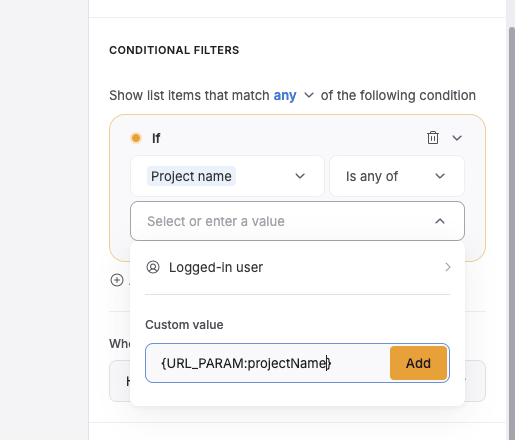
projectName is subjective and can be whatever you like, but it needs to be used in both the URL and the conditional filter to work properly. Avoid using spaces and symbols in URL parameter names. If you need to use spaces or symbols in the parameter’s value, make sure they are URL encoded such as Kingsport%20Diner (Kingsport Diner).