

Run Custom Code
Applies to: Run Custom Code 1.0.0, 1.1.0, 1.2.0The Run Custom Code action runs JavaScript or Python inside your workflow. Use it for logic that formulas cannot express: parsing complex JSON, multi-step transformations, or calls to an API that has no dedicated action yet. The code can call HTTP APIs, and from version 1.2.0 the integrations you attach to the step authenticate those calls for you.
Run Custom Code is available on the Pro plan and above.
How the step works
- Data to use in the code: name the values your code needs and map them to outputs of earlier steps. The code reads them from
inputData. - Integrations the code can call (1.2.0 and later): attach the connected integrations the code may talk to. Each one gets an alias, a short name the code can use.
- Language and Code: write the body of a function. Whatever you
returnbecomes the output of the step, available to later steps asbody.
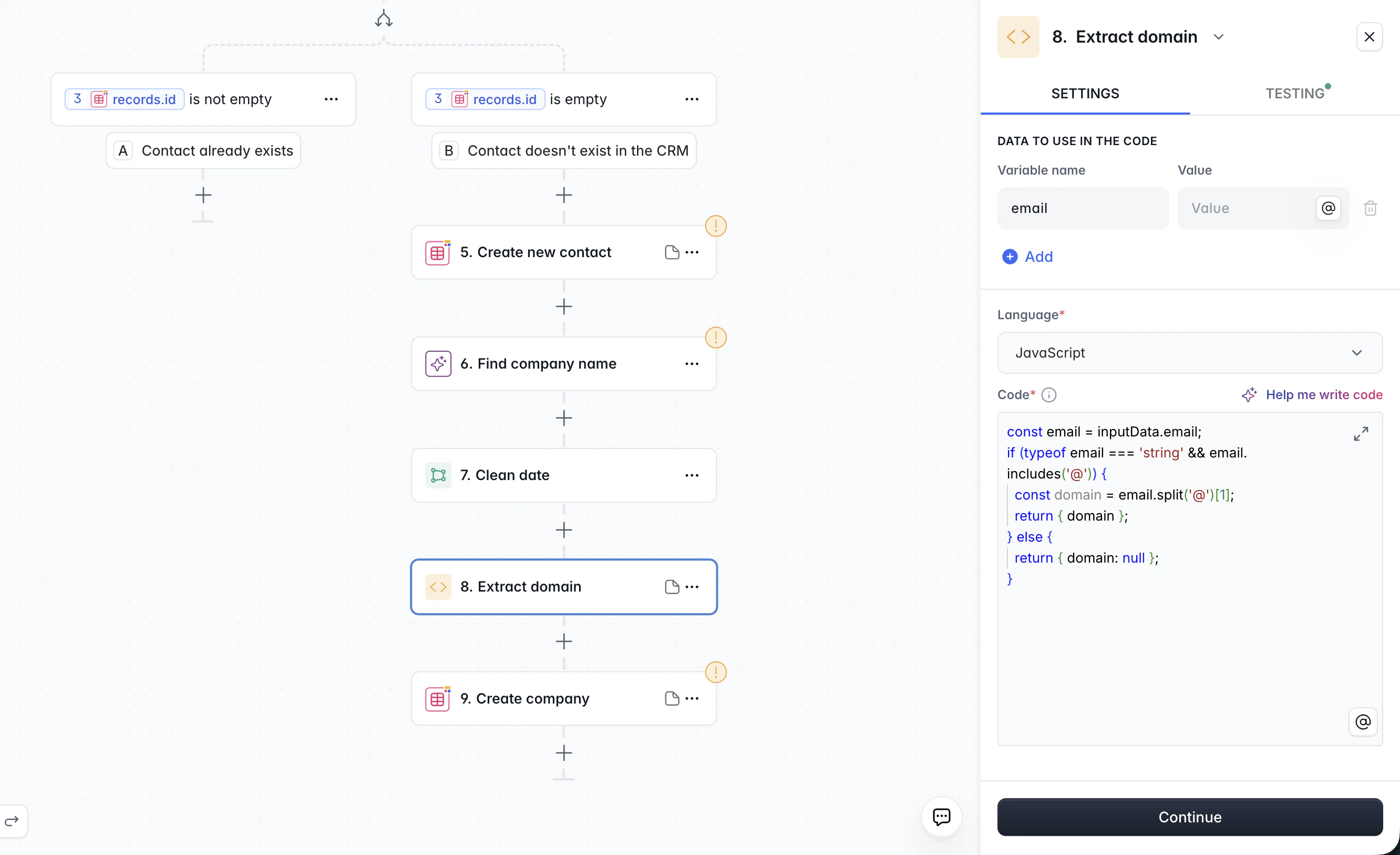
Run Custom Code action with JavaScript extracting a domain from an email
Reading input data
Every entry of Data to use in the code is a key ofinputData. A value that is exactly one variable keeps its type: a number stays a number, a record stays an object, a list stays an array.
Returning a result
Return any JSON-compatible value: an object, a list, a string, a number or a boolean. Later steps reference it through the variable menu asbody, or a field of it. A thrown error or a raised exception fails the step, and the message appears in the run details and in Test your step.
Calling APIs with fetch
Applies to: 1.2.0 and laterBoth languages offer
fetch(url, options). It sends an HTTP request and returns a response object. In JavaScript you await it; in Python it is a plain call.
Response
Letting an integration authenticate the call
Attach the integrations your code talks to under Integrations the code can call. When the code calls a URL on the API host of an attached integration, the request carries that integration’s credentials automatically. The code never sees a token, and nothing you paste into the code is needed.- The credentials are only added when the URL points at the provider’s own API host. A call to any other host goes out without them, whatever alias you pass.
- You can attach every integration the Call API action can authenticate with. Database connections, Softr Databases, Softr Apps, Telegram and Trello cannot be attached, because their credentials have no HTTP header form.
- An alias is a short name of letters, digits and underscores, unique within the step. It defaults to the integration type, such as
salesforceorrest_api. - A REST API integration has no provider host, so it never authenticates a call by host alone. Name its alias in the call, and its headers go to whatever host that call names.
Calls without an integration
fetch also reaches any public host without an attached integration. The request is sent exactly as you wrote it, including any headers you set. Private networks, localhost and cloud metadata addresses are blocked.
Calling HTTP APIs with http and https
Applies to: 1.0.0, 1.1.0
Removed in: 1.2.0. Use fetch instead.
JavaScript can call HTTP APIs with the Node.js http and https modules. Return the promise of the result; the step waits for it.
localhost and the cloud metadata addresses are blocked.
Cryptography
Both languages come with a cryptography module. The code can hash values, compute and check HMAC signatures, and decrypt or verify data that a partner encrypted or signed with RSA.JavaScript: crypto and Buffer
Applies to: 1.0.0, 1.1.0, 1.2.0
crypto is the Node.js crypto module: createHash, createHmac, privateDecrypt, publicEncrypt, sign, verify, randomUUID and the rest of it. Buffer converts between text, base64, hex and raw bytes.
Python: rsa
Applies to: 1.0.0, 1.1.0, 1.2.0
import rsa gives you the API of the rsa package: rsa.PrivateKey.load_pkcs1 and rsa.PublicKey.load_pkcs1 read a PEM or DER key in PKCS#1 or PKCS#8 form, rsa.decrypt and rsa.verify accept the ciphertext or signature as base64 text or as bytes, and rsa.encrypt, rsa.sign, rsa.DecryptionError and rsa.VerificationError work as in the package. Padding is PKCS#1 v1.5.
Runtimes and limits
When something fails
- A script error fails the step with the message of the error or exception. Test the step to see it while you write the code.
- A
fetcherror (1.2.0 and later) is raised as an exception in your code, so you can catch it. Its message names the reason: a blocked host, an unknown alias, too many calls, or a target that did not answer. - Execution timed out, Async script timed out and Memory limit exceeded name the limit the run hit. Split the work between steps, or narrow the data the step receives.
Versions
Steps created with an earlier version of Run Custom Code keep working. Opening such a step in the workflow editor upgrades it to the current version; code that usedhttp or https must switch to fetch then. The Applies to line at the top of this page names the versions the page covers. An Applies to line under a heading names the versions that section applies to; without one, a section applies to every version of the page. A Removed in line names the version that dropped that part, and a Version history block lists what changed inside it.