

Pricing plans
Softr offers four self-serve plans plus a custom Enterprise plan. Prices are in USD. Choosing annual billing gives you roughly two months free compared to paying monthly.What’s included in each plan
You can see more about what is included in each plan by visiting our detailed Pricing page.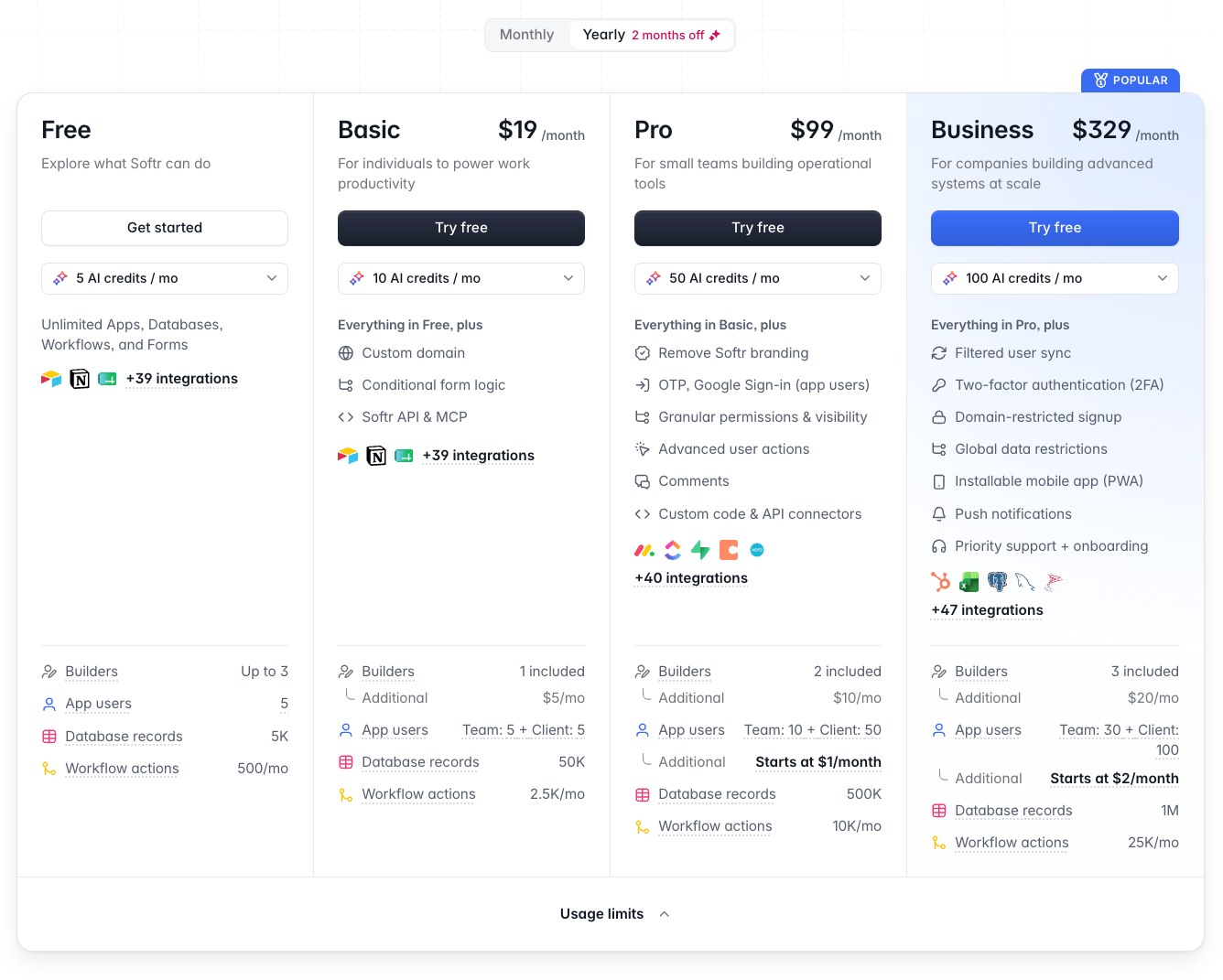
The plan comparison table
Upgrading the subscription plan
Open Plan and billing
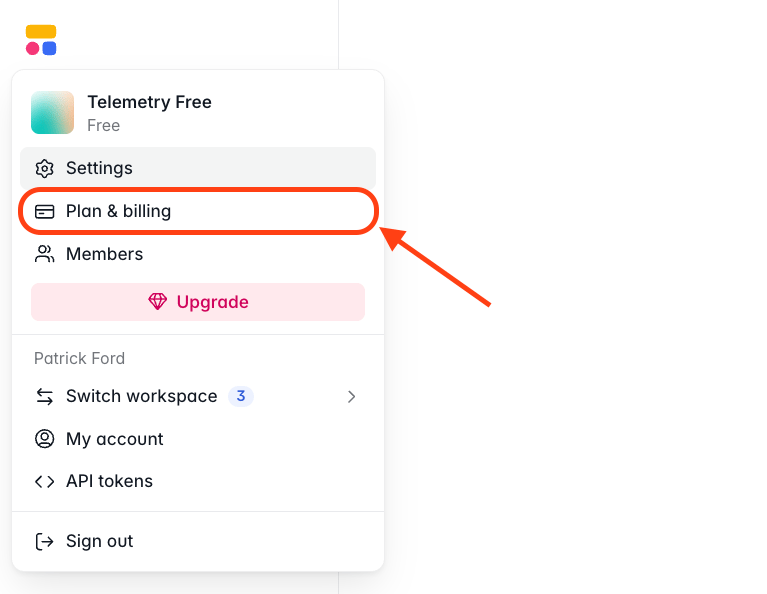
The Plan and billing section
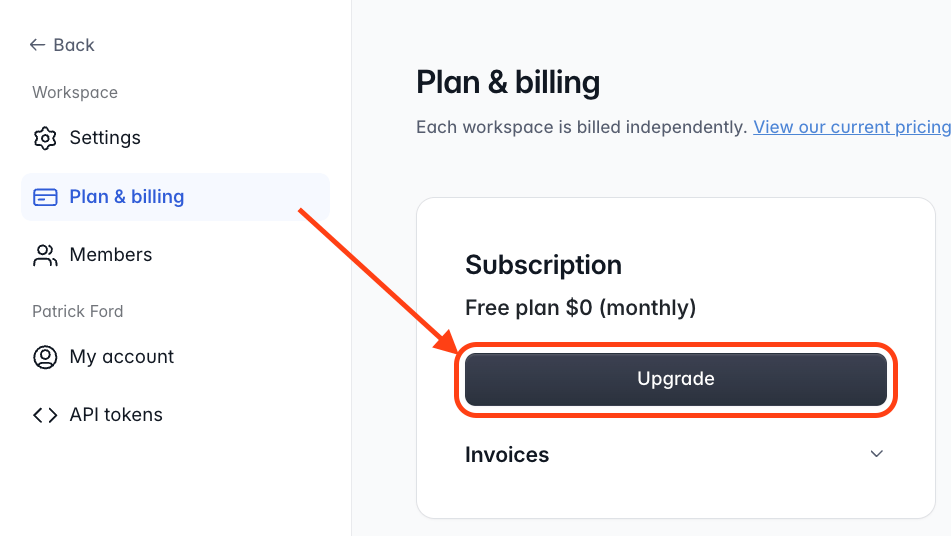
Choose a plan and billing frequency
Complete checkout
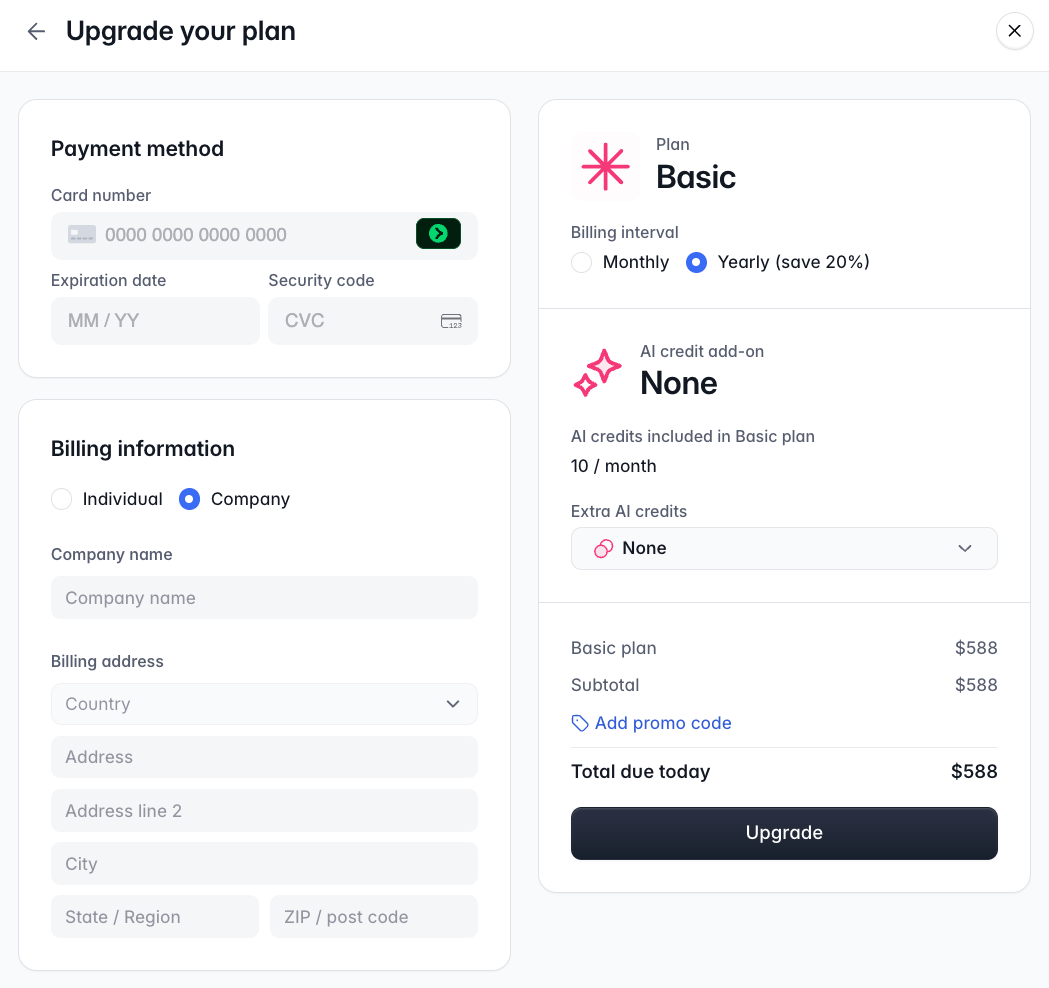
The plan checkout screen
Monthly vs annual billing
Monthly billing charges a recurring fee at the start of each monthly cycle. Annual billing is paid upfront for 12 months and works out cheaper — you get roughly two months free compared to the monthly rate. You can switch between monthly and annual billing using the toggle in the plan selection modal.Promo code
If you have a promo code, enter it during checkout before finalizing your subscription.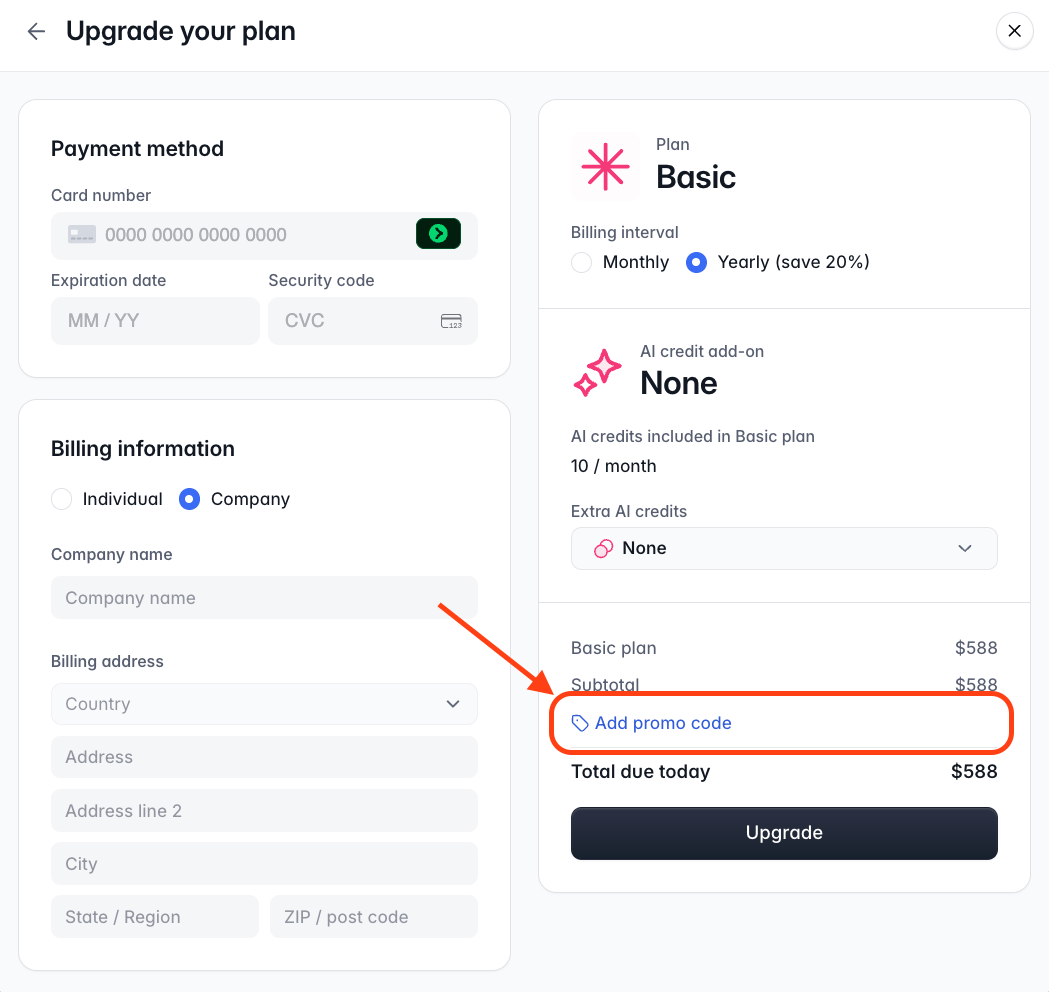
The promo code field at checkout
Free Trial vs Free Plan
The Free plan is available forever and lets you build apps, databases, workflows, and forms to try Softr out. Signing up for the first time starts a 7-day free trial with full access to the Business plan’s premium features. Attaching a credit card will extend your trial by another 7 days, for a total of a 14-day trial.Understanding app users and app builders
App users are the people who log in to and use your published apps. App builders are people you add to your Softr workspace to help build your apps, databases, workflows, and forms. How they’re counted depends on their relationship to your workspace and apps.Workspace members
Team app users
Client app users
How app users are counted
- The same email across multiple apps is counted only once.
- Deactivated users don’t count toward your allowance.
- Only Basic and higher plans separate Team and Client users; the Free plan has a single combined allowance of 5 users. Each plan includes a set number of Team and Client users, with the option to add more on Pro and Business:
Add-ons
Some plans let you expand beyond their included limits with add-ons.Extra app users
On Pro and Business, you can go beyond the included Team and Client user counts up to each plan’s maximum (see the table above). Extra users are billed automatically on a pay-as-you-go basis. How extra-user billing works:- Extra users are billed monthly, even if your base plan is billed annually. The extra-user billing cycle aligns with your base plan’s start date.
- Your workspace’s user count is checked once a day, so brief fluctuations won’t trigger surprise charges.
- When your usage first exceeds your included allowance, we email the workspace owner and start a 7-day grace period before any charge, so you have time to adjust. If usage is still above the allowance at the end of the grace period, the extra users are billed (prorated).
- If your user count drops, we don’t refund mid-cycle — the allowance stays available until your next renewal, at which point unused packs are removed automatically from the new bill.
Extra app builders
Builders are the people who can build and edit apps, databases, workflows, and forms in your workspace. Each plan includes a set number. Basic plan and up let you add more:Extra custom domains
All paid plans include 1 custom domain. You can add more for $13/mo (billed annually) or $15/mo (billed monthly) each. The Free plan doesn’t include a custom domain.Trials, upgrades, and downgrades
- During a trial (opt-in or reverse trial), you can add extra users immediately if your plan allows it, with no grace period. Each plan’s maximum user limit still applies. If you still have extra users when the trial ends, a grace period begins once the first base-plan payment succeeds.
- When you upgrade, you confirm the new cost at checkout, so any extra users are billed right away.
- When you downgrade, the change is scheduled for your next renewal. If you still have extra users after the downgrade takes effect, a grace period begins before those users are billed.
Deleting your account
You can delete your account at any time from My Account in your account settings.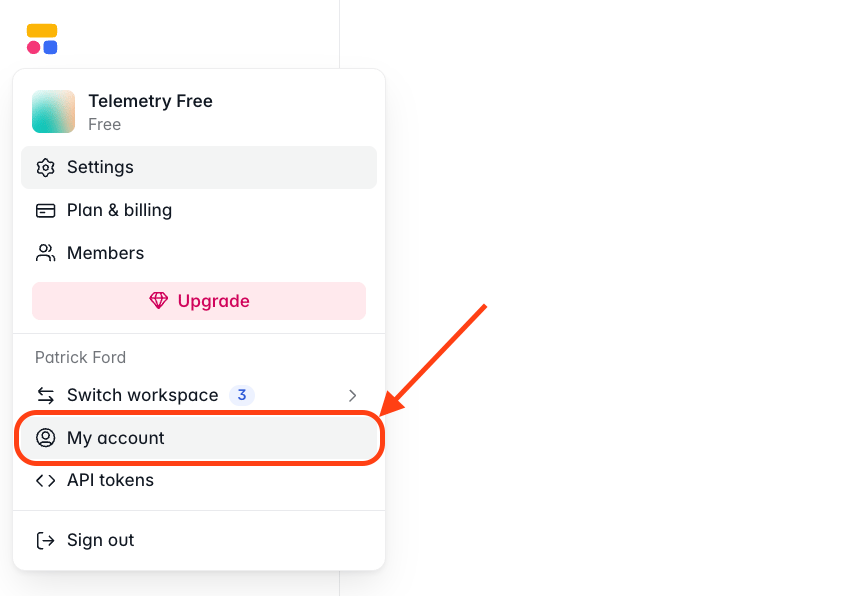
The account deletion flow in My Account
FAQ
What are the different pricing plans of Softr?
What are the different pricing plans of Softr?
- Free — $0. Great for personal productivity and trying Softr, with up to 3 builders and 5 app users.
- Basic — $19/mo billed annually ($25/mo monthly). 1 builder, 5 Team + 5 Client users, 1 custom domain.
- Pro — $99/mo billed annually ($119/mo monthly). 2 builders, expandable Team (10, max 50) and Client (50, max 250) users, 3 custom user groups.
- Business — $329/mo billed annually ($395/mo monthly). 3 builders, expandable Team (30, max 100) and Client (100, max 500) users, 10 custom user groups.
- Enterprise — Custom pricing for mid-market and enterprise teams, including advanced data sources like Snowflake and BigQuery and even custom integrations (Contact Sales).
Which plan is right for me?
Which plan is right for me?
- Free — For exploring what Softr can do. You get a taste of how key features work but have a limited usage allowance.
- Basic — For professionals building apps to boost their work productivity. Ideal for early adopters within companies building lightweight apps — think simple internal tools used by 2–3 people, or automations that replace basic tasks.
- Pro — For small teams building client-facing apps or internal tools essential for their day-to-day operations. Start here if you want your apps to be fully branded, with custom role-based permissions.
- Business — For companies building systems at scale. Think business-critical applications that are used by multiple departments, connect to multiple integrations, and have complex logic and permissions.
- Enterprise — For organizations with advanced security, compliance, and support requirements. Includes SSO, SCIM, audit logs, and SOC 2 access, plus custom limits, tailored agreements, and white-glove support to fit how your company operates.
Does Softr offer a free trial?
Does Softr offer a free trial?
Is Softr's Free plan really free?
Is Softr's Free plan really free?
What is the difference between a Builder and an App User?
What is the difference between a Builder and an App User?
How are app users counted?
How are app users counted?
- The same email used in multiple apps is counted only once.
- Deactivated users aren’t counted.
- Builders in your workspace can be added as app users without counting toward your limit.
What is the difference between a Team User and a Client User?
What is the difference between a Team User and a Client User?
What if I need additional app users?
What if I need additional app users?
What happens if I hit the monthly workflow execution limit?
What happens if I hit the monthly workflow execution limit?
Can I continue to build after running out of AI credits?
Can I continue to build after running out of AI credits?
Do unused AI credits roll over?
Do unused AI credits roll over?
What if I need more custom domains?
What if I need more custom domains?
What is your refund policy?
What is your refund policy?
Do you offer non-profit and education discounts?
Do you offer non-profit and education discounts?
What payment methods do you accept?
What payment methods do you accept?
Can I cancel or switch plans anytime?
Can I cancel or switch plans anytime?