> ## Documentation Index
> Fetch the complete documentation index at: https://docs.softr.io/llms.txt
> Use this file to discover all available pages before exploring further.
# Run Custom Code
> Run JavaScript or Python inside a workflow: read the data of earlier steps, return a result, and hash, sign or decrypt values with the built-in cryptography modules.
# Run Custom Code
> **Applies to:** Run Custom Code 1.0.0, 1.1.0
The **Run Custom Code** action runs **JavaScript** or **Python** inside your workflow. Use it for logic that formulas cannot express: parsing complex JSON, multi-step transformations, or a calculation that would need deeply nested branches.
Run Custom Code is available on paid plans.
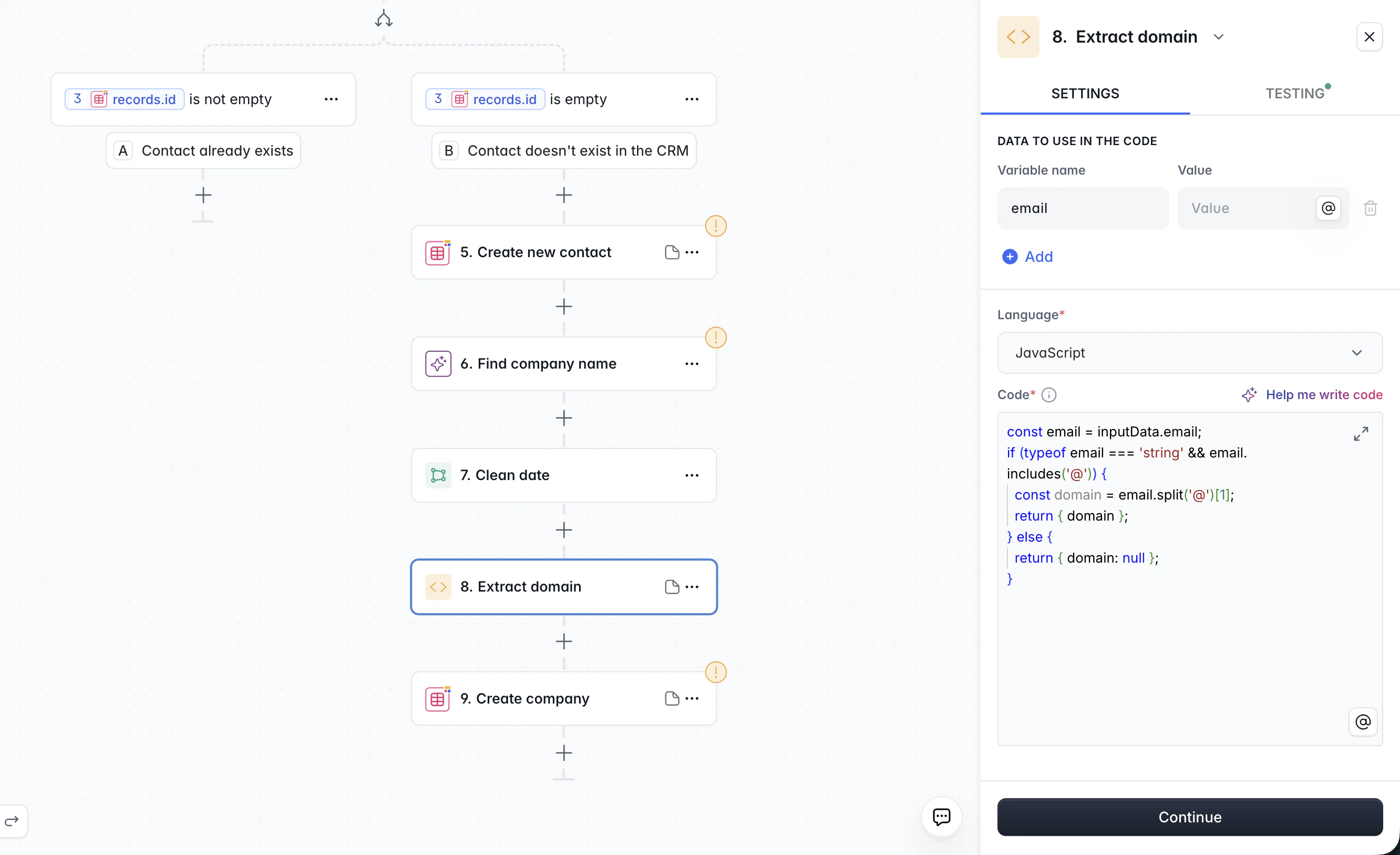
You don't need to write code from scratch. Click **Help me write code** in the code editor, describe what you want in plain language, and the AI assistant generates the code for you.
## How the step works
1. **Data to use in the code**: name the values your code needs and map them to outputs of earlier steps. The code reads them from `inputData`.
2. **Language** and **Code**: write the body of a function. Whatever you `return` becomes the output of the step, available to later steps as `body`.
 ## Reading input data
Every entry of **Data to use in the code** is a key of `inputData`. A value that is exactly one variable keeps its type: a number stays a number, a record stays an object, a list stays an array.
```javascript JavaScript theme={null}
const email = inputData.email;
const items = inputData.items;
return { domain: email.split('@')[1], count: items.length };
```
```python Python theme={null}
email = inputData['email']
items = inputData['items']
return {'domain': email.split('@')[1], 'count': len(items)}
```
## Returning a result
Return any JSON-compatible value: an object, a list, a string, a number or a boolean. Later steps reference it through the variable menu as `body`, or a field of it. A thrown error or a raised exception fails the step, and the message appears in the run details and in **Test your step**.
## Cryptography
Both languages come with a cryptography module. The code can hash values, compute and check HMAC signatures, and decrypt or verify data that a partner encrypted or signed with RSA.
### JavaScript: `crypto` and `Buffer`
> **Version history**
>
> * Added to 1.0.0 and 1.1.0 in September 2026.
`crypto` is the Node.js `crypto` module: `createHash`, `createHmac`, `privateDecrypt`, `publicEncrypt`, `sign`, `verify`, `randomUUID` and the rest of it. `Buffer` converts between text, base64, hex and raw bytes.
```javascript theme={null}
const decrypted = crypto.privateDecrypt(
{ key: inputData.privateKeyPem, padding: crypto.constants.RSA_PKCS1_PADDING },
Buffer.from(inputData.encryptedToken, 'base64'),
);
const signature = crypto.createHmac('sha256', inputData.signingSecret).update(inputData.payload).digest('hex');
return { token: decrypted.toString('utf8'), signature };
```
### Python: `rsa`
> **Version history**
>
> * Added to 1.0.0 and 1.1.0 in September 2026.
`import rsa` gives you the API of the `rsa` package: `rsa.PrivateKey.load_pkcs1` and `rsa.PublicKey.load_pkcs1` read a PEM or DER key in PKCS#1 or PKCS#8 form, `rsa.decrypt` and `rsa.verify` accept the ciphertext or signature as base64 text or as bytes, and `rsa.encrypt`, `rsa.sign`, `rsa.DecryptionError` and `rsa.VerificationError` work as in the package. Padding is PKCS#1 v1.5.
```python theme={null}
import rsa
key = rsa.PrivateKey.load_pkcs1(inputData['privateKeyPem'])
token = rsa.decrypt(inputData['encryptedToken'], key).decode()
return {'token': token}
```
Keep private keys and secrets out of the code. Pass them in through **Data to use in the code**, mapped from a place only the right people can read, such as a record in a table with restricted access. The code then stays readable, and the same key is not repeated in every step that needs it.
## Calling HTTP APIs
JavaScript can call HTTP APIs with the Node.js `http` and `https` modules. Return the promise of the result; the step waits for it.
```javascript theme={null}
return new Promise((resolve, reject) => {
const url = 'https://api.example.com/v1/contacts?email=' + encodeURIComponent(inputData.email);
const req = https.request(url, { headers: { Authorization: 'Bearer ' + inputData.apiToken } }, (res) => {
let data = '';
res.on('data', (chunk) => (data += chunk));
res.on('end', () => resolve(JSON.parse(data)));
});
req.on('error', reject);
req.end();
});
```
Python code has no network access. In JavaScript, `localhost` and the cloud metadata addresses are blocked.
## Runtimes and limits
| | JavaScript | Python |
| ----------------- | ------------------------------------------------------------------------------------------------------------------------------------ | ------------------------------------------------------------------------------------------------------------------------------------------------------------------------------------------------------------------------------------------------------------------------------------------------------------------------------------------------------------------------------- |
| **Runtime** | Node.js | Python 3.11 |
| **Available** | `crypto` (the Node.js `crypto` module), `Buffer`, `http`, `https`, timers, promises, `JSON`, `Math`, `Date`, regular expressions | `rsa` (RSA with PKCS#1 v1.5 padding, PKCS#1 or PKCS#8 keys), these standard modules: `json`, `re`, `math`, `statistics`, `decimal`, `fractions`, `datetime`, `random`, and these built-in functions: `len`, `range`, `enumerate`, `zip`, `sorted`, `reversed`, `min`, `max`, `sum`, `abs`, `round`, `all`, `any`, `str`, `int`, `float`, `bool`, `list`, `dict`, `set`, `tuple` |
| **Not available** | `require`, `import`, `fetch`, top-level `await` (return a promise instead), `console` output, the file system, environment variables | `open`, `print` output, `isinstance`, `map`, `filter`, `bytes`, `os`, `sys`, `subprocess`, `requests`, `urllib`, `class` statements, other modules and packages, attribute names that start with `__` |
| Limit | Value |
| ---------------------- | ---------------------------------------------------------------------------------------------------------- |
| Synchronous JavaScript | Two seconds. A longer stretch of code without a promise in between is stopped. |
| Returned promise | Must settle within five seconds; the step then fails with **Async script timed out after 5000ms**. |
| Python run time | Three seconds, of which at most two seconds of CPU time; the step then fails with **Execution timed out**. |
| Python memory | 256 MB; the step then fails with **Memory limit exceeded**. |
## When something fails
* A **script error** fails the step with the message of the error or exception. Test the step to see it while you write the code.
* **Async script timed out**, **Execution timed out** and **Memory limit exceeded** name the limit the run hit. Split the work between steps, or narrow the data the step receives.
## Versions
Steps created with an earlier version of Run Custom Code keep working. The **Applies to** line at the top of this page names the versions the page covers. An **Applies to** line under a heading names the versions that section applies to; without one, a section applies to every version of the page. A **Version history** block under a heading lists what changed for that part.
| Version | What changed |
| ------- | ------------------------------------- |
| 1.1.0 | The same inputs and runtime as 1.0.0. |
| 1.0.0 | The first version. |
Building workflows as code? The [Softr Workflows CLI](https://github.com/softr-io/softr-workflows-cli) keeps every Run Custom Code step in a real `.js` or `.py` file next to the workflow definition.
## Reading input data
Every entry of **Data to use in the code** is a key of `inputData`. A value that is exactly one variable keeps its type: a number stays a number, a record stays an object, a list stays an array.
```javascript JavaScript theme={null}
const email = inputData.email;
const items = inputData.items;
return { domain: email.split('@')[1], count: items.length };
```
```python Python theme={null}
email = inputData['email']
items = inputData['items']
return {'domain': email.split('@')[1], 'count': len(items)}
```
## Returning a result
Return any JSON-compatible value: an object, a list, a string, a number or a boolean. Later steps reference it through the variable menu as `body`, or a field of it. A thrown error or a raised exception fails the step, and the message appears in the run details and in **Test your step**.
## Cryptography
Both languages come with a cryptography module. The code can hash values, compute and check HMAC signatures, and decrypt or verify data that a partner encrypted or signed with RSA.
### JavaScript: `crypto` and `Buffer`
> **Version history**
>
> * Added to 1.0.0 and 1.1.0 in September 2026.
`crypto` is the Node.js `crypto` module: `createHash`, `createHmac`, `privateDecrypt`, `publicEncrypt`, `sign`, `verify`, `randomUUID` and the rest of it. `Buffer` converts between text, base64, hex and raw bytes.
```javascript theme={null}
const decrypted = crypto.privateDecrypt(
{ key: inputData.privateKeyPem, padding: crypto.constants.RSA_PKCS1_PADDING },
Buffer.from(inputData.encryptedToken, 'base64'),
);
const signature = crypto.createHmac('sha256', inputData.signingSecret).update(inputData.payload).digest('hex');
return { token: decrypted.toString('utf8'), signature };
```
### Python: `rsa`
> **Version history**
>
> * Added to 1.0.0 and 1.1.0 in September 2026.
`import rsa` gives you the API of the `rsa` package: `rsa.PrivateKey.load_pkcs1` and `rsa.PublicKey.load_pkcs1` read a PEM or DER key in PKCS#1 or PKCS#8 form, `rsa.decrypt` and `rsa.verify` accept the ciphertext or signature as base64 text or as bytes, and `rsa.encrypt`, `rsa.sign`, `rsa.DecryptionError` and `rsa.VerificationError` work as in the package. Padding is PKCS#1 v1.5.
```python theme={null}
import rsa
key = rsa.PrivateKey.load_pkcs1(inputData['privateKeyPem'])
token = rsa.decrypt(inputData['encryptedToken'], key).decode()
return {'token': token}
```
Keep private keys and secrets out of the code. Pass them in through **Data to use in the code**, mapped from a place only the right people can read, such as a record in a table with restricted access. The code then stays readable, and the same key is not repeated in every step that needs it.
## Calling HTTP APIs
JavaScript can call HTTP APIs with the Node.js `http` and `https` modules. Return the promise of the result; the step waits for it.
```javascript theme={null}
return new Promise((resolve, reject) => {
const url = 'https://api.example.com/v1/contacts?email=' + encodeURIComponent(inputData.email);
const req = https.request(url, { headers: { Authorization: 'Bearer ' + inputData.apiToken } }, (res) => {
let data = '';
res.on('data', (chunk) => (data += chunk));
res.on('end', () => resolve(JSON.parse(data)));
});
req.on('error', reject);
req.end();
});
```
Python code has no network access. In JavaScript, `localhost` and the cloud metadata addresses are blocked.
## Runtimes and limits
| | JavaScript | Python |
| ----------------- | ------------------------------------------------------------------------------------------------------------------------------------ | ------------------------------------------------------------------------------------------------------------------------------------------------------------------------------------------------------------------------------------------------------------------------------------------------------------------------------------------------------------------------------- |
| **Runtime** | Node.js | Python 3.11 |
| **Available** | `crypto` (the Node.js `crypto` module), `Buffer`, `http`, `https`, timers, promises, `JSON`, `Math`, `Date`, regular expressions | `rsa` (RSA with PKCS#1 v1.5 padding, PKCS#1 or PKCS#8 keys), these standard modules: `json`, `re`, `math`, `statistics`, `decimal`, `fractions`, `datetime`, `random`, and these built-in functions: `len`, `range`, `enumerate`, `zip`, `sorted`, `reversed`, `min`, `max`, `sum`, `abs`, `round`, `all`, `any`, `str`, `int`, `float`, `bool`, `list`, `dict`, `set`, `tuple` |
| **Not available** | `require`, `import`, `fetch`, top-level `await` (return a promise instead), `console` output, the file system, environment variables | `open`, `print` output, `isinstance`, `map`, `filter`, `bytes`, `os`, `sys`, `subprocess`, `requests`, `urllib`, `class` statements, other modules and packages, attribute names that start with `__` |
| Limit | Value |
| ---------------------- | ---------------------------------------------------------------------------------------------------------- |
| Synchronous JavaScript | Two seconds. A longer stretch of code without a promise in between is stopped. |
| Returned promise | Must settle within five seconds; the step then fails with **Async script timed out after 5000ms**. |
| Python run time | Three seconds, of which at most two seconds of CPU time; the step then fails with **Execution timed out**. |
| Python memory | 256 MB; the step then fails with **Memory limit exceeded**. |
## When something fails
* A **script error** fails the step with the message of the error or exception. Test the step to see it while you write the code.
* **Async script timed out**, **Execution timed out** and **Memory limit exceeded** name the limit the run hit. Split the work between steps, or narrow the data the step receives.
## Versions
Steps created with an earlier version of Run Custom Code keep working. The **Applies to** line at the top of this page names the versions the page covers. An **Applies to** line under a heading names the versions that section applies to; without one, a section applies to every version of the page. A **Version history** block under a heading lists what changed for that part.
| Version | What changed |
| ------- | ------------------------------------- |
| 1.1.0 | The same inputs and runtime as 1.0.0. |
| 1.0.0 | The first version. |
Building workflows as code? The [Softr Workflows CLI](https://github.com/softr-io/softr-workflows-cli) keeps every Run Custom Code step in a real `.js` or `.py` file next to the workflow definition.