> ## Documentation Index
> Fetch the complete documentation index at: https://docs.softr.io/llms.txt
> Use this file to discover all available pages before exploring further.
# Page Visibility
> Make a page visible to selected user group(s).
Page visibility can be used when you want to restrict a certain page to just **Logged in users** or just **Non Logged in users.** It is configured in [Page Settings](/0392ff65acfe4b1c96923c1aac7982f7) => **Visibility** and has the following options:
* **All users** (selected by default)
* **Logged in users**
* **Non Logged in users**
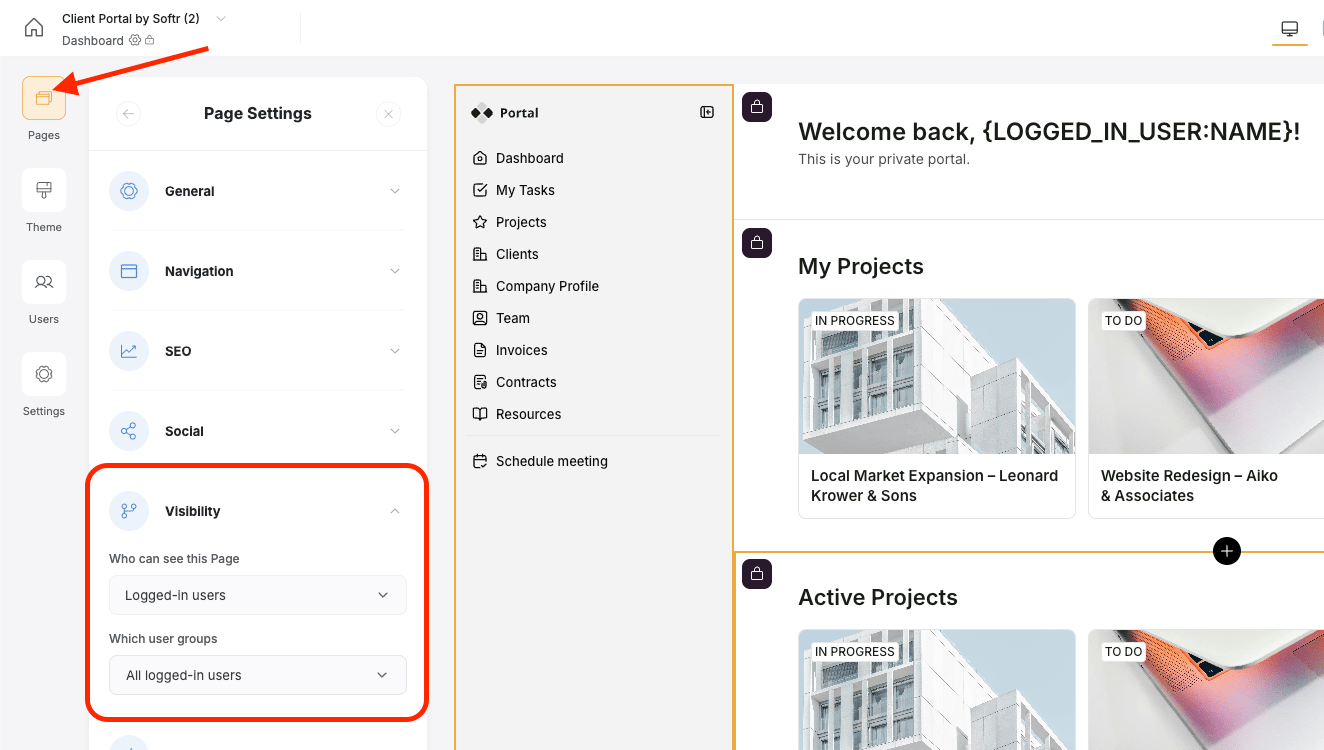 This functionality can be used to have gated content on your Softr app, allowing only logged in users to view specific pages. [Here](/how-to-guides/ioi5BbuQ2RDM7aHPrpXnjG/how-to-create-a-membership-site/diSie6ZE72tDDvrfBkmcmm), we've shown how it can be used to make the page with online courses accessible to logged in users only.
Please, keep in mind that gated content (e.g. pages that are only accessible to logged-in users or a specific group of users) will not be crawled by search engines.
## Custom User Groups
The **User Groups** settings for the page are similar to [that of the block](/user-groups-and-permissions/3oA6AaFzUiePs2sW2TpYrF/user-groups/6XQfKMeKHUvBcAjKvLs3g3) but allow setting access for the whole page.
This functionality can be used to have gated content on your Softr app, allowing only logged in users to view specific pages. [Here](/how-to-guides/ioi5BbuQ2RDM7aHPrpXnjG/how-to-create-a-membership-site/diSie6ZE72tDDvrfBkmcmm), we've shown how it can be used to make the page with online courses accessible to logged in users only.
Please, keep in mind that gated content (e.g. pages that are only accessible to logged-in users or a specific group of users) will not be crawled by search engines.
## Custom User Groups
The **User Groups** settings for the page are similar to [that of the block](/user-groups-and-permissions/3oA6AaFzUiePs2sW2TpYrF/user-groups/6XQfKMeKHUvBcAjKvLs3g3) but allow setting access for the whole page.