> ## Documentation Index
> Fetch the complete documentation index at: https://docs.softr.io/llms.txt
> Use this file to discover all available pages before exploring further.
# Action Button Visibility
> Configuring who can see the Action Button.
Button visibility options depend on the subscription plan:
→ On Free and Starter plans you can decide who can see the button (All Users, Logged-in Users, or Non Logged-in Users)
→ On Professional plan you can also configure conditional visibilitybut can’t set [custom user groups](/user-groups-and-permissions/3oA6AaFzUiePs2sW2TpYrF/user-groups/6XQfKMeKHUvBcAjKvLs3g3).
→ On Business plan you have access to all the features in Button Visibility.
→ Not all Action buttons can be configured to be visible for non-logged in users. For example, Edit, One-click Update, and Delete cannot be shown to visitors.
See [plan comparison](https://www.softr.io/pricing).
Each [Action Button](/actions/ntEfT9zSJk6aY54G6W5KGU/action-buttons-overview/idg8Fqf2kjFwcx6kyP3jNq) has a **Button Visibility** section where you can define which users the button is accessible to.
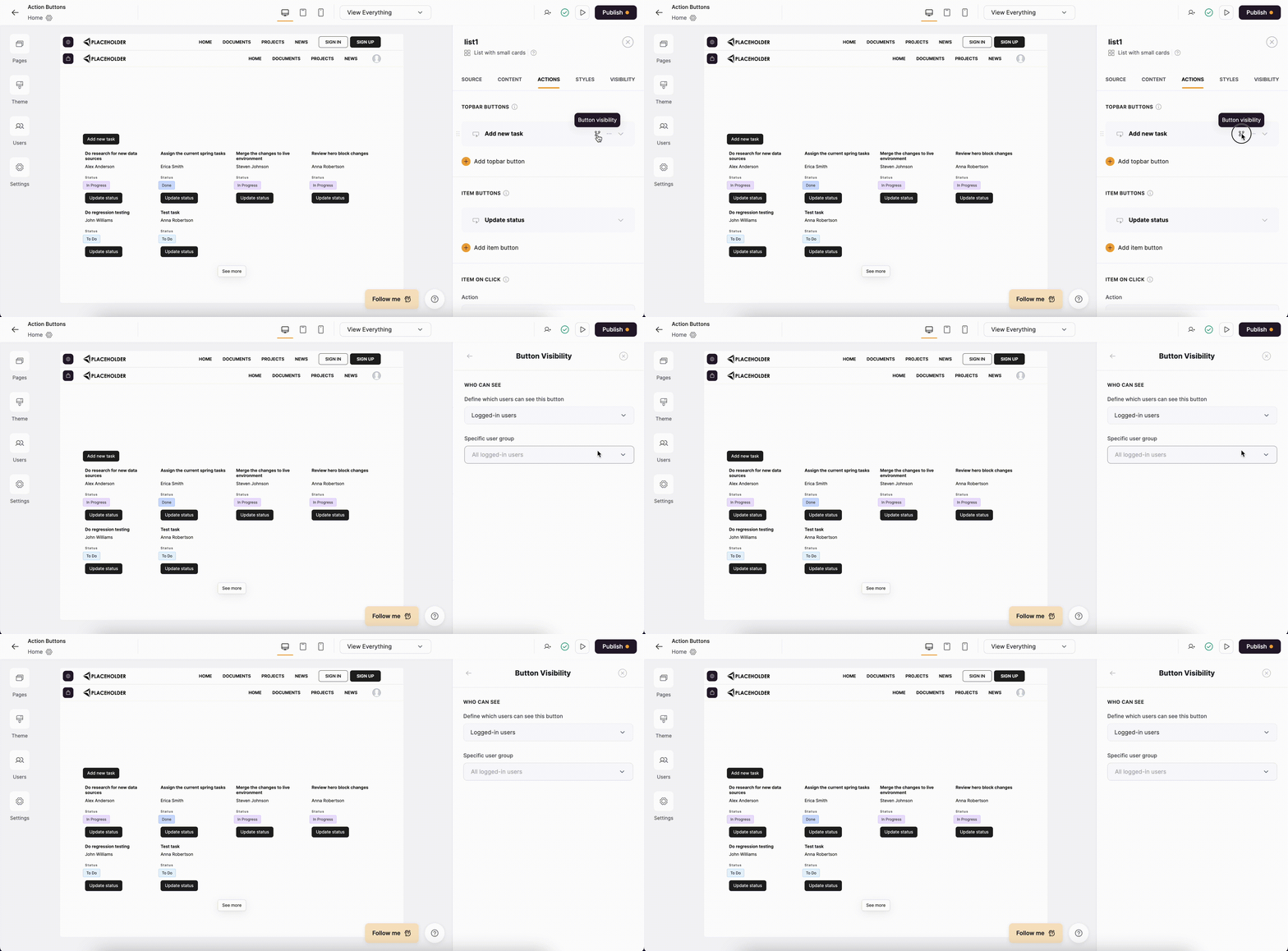 **Topbar buttons** such as the [Add Record](/actions/ntEfT9zSJk6aY54G6W5KGU/add-record/3LrUMpQY4BKfDDQj6eb8h8) button have only the **Who can see** section, where you can choose between **all users**, **logged-in users** and **non logged-in users** as well as select a specific [user group](/user-groups-and-permissions/3oA6AaFzUiePs2sW2TpYrF/user-groups/6XQfKMeKHUvBcAjKvLs3g3), so that the button is visible only to the selected custom user group.
**Item buttons** (such as the [Update Record](/actions/ntEfT9zSJk6aY54G6W5KGU/edit-record/irSJXPF1gCMXNmfsQFscvx) button), on the other hand, also have an option to set conditional visibility (called **On which record**) to show selected records based on conditional rules.
The **conditional visibility** works similar to [List Conditional Filters](/user-groups-and-permissions/3oA6AaFzUiePs2sW2TpYrF/conditional-filters/mDnn7jnpPiYmJcT99jpt7m).
We set up button visibility when configuring [Add Record](/actions/ntEfT9zSJk6aY54G6W5KGU/add-record/3LrUMpQY4BKfDDQj6eb8h8) and [Update Record](/actions/ntEfT9zSJk6aY54G6W5KGU/edit-record/irSJXPF1gCMXNmfsQFscvx) buttons, so you can check out these articles for specific examples of customizing button visibility.
**Topbar buttons** such as the [Add Record](/actions/ntEfT9zSJk6aY54G6W5KGU/add-record/3LrUMpQY4BKfDDQj6eb8h8) button have only the **Who can see** section, where you can choose between **all users**, **logged-in users** and **non logged-in users** as well as select a specific [user group](/user-groups-and-permissions/3oA6AaFzUiePs2sW2TpYrF/user-groups/6XQfKMeKHUvBcAjKvLs3g3), so that the button is visible only to the selected custom user group.
**Item buttons** (such as the [Update Record](/actions/ntEfT9zSJk6aY54G6W5KGU/edit-record/irSJXPF1gCMXNmfsQFscvx) button), on the other hand, also have an option to set conditional visibility (called **On which record**) to show selected records based on conditional rules.
The **conditional visibility** works similar to [List Conditional Filters](/user-groups-and-permissions/3oA6AaFzUiePs2sW2TpYrF/conditional-filters/mDnn7jnpPiYmJcT99jpt7m).
We set up button visibility when configuring [Add Record](/actions/ntEfT9zSJk6aY54G6W5KGU/add-record/3LrUMpQY4BKfDDQj6eb8h8) and [Update Record](/actions/ntEfT9zSJk6aY54G6W5KGU/edit-record/irSJXPF1gCMXNmfsQFscvx) buttons, so you can check out these articles for specific examples of customizing button visibility.