> ## Documentation Index
> Fetch the complete documentation index at: https://docs.softr.io/llms.txt
> Use this file to discover all available pages before exploring further.
# Page SEO
> Customizing SEO settings for each separate page.
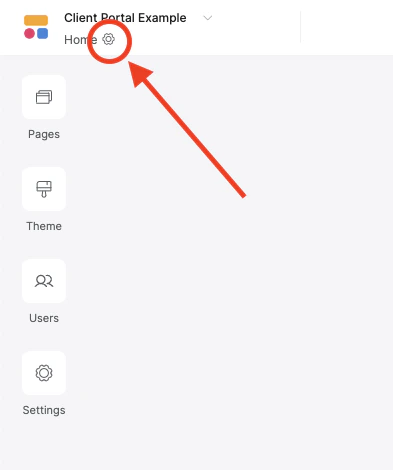
You can add a meta title and description in the SEO section of the page’s [settings](/0392ff65acfe4b1c96923c1aac7982f7). The meta title should be around 40 characters or less and the description should be anywhere between 160-180 characters. To open the page settings, click on the little gear icon in the upper left of an page in Softr Studio:
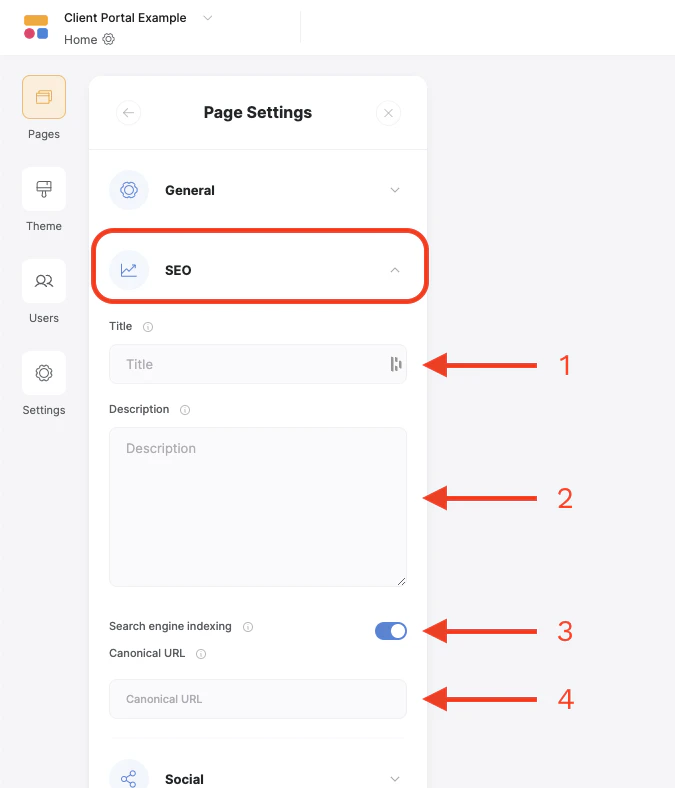
 Once open, click on the SEO dropdown section to access the title, description and other settings.
1. **Title** - This normally appears in the tab of the browser and in search engine results if Search Indexing is enabled (see below). Should be around 40 characters or less
2. **Description** - Appears in search engine results if Search Indexing is enabled. Should be between 160-180 characters.
3. **Search Engine Indexing** - This toggle will allow search engines to find and index the page. If turned off, the page will not be visible to search engines.
4. **Canonical URL** - The canonical URL is the preferred URL for this page. If set, you can have similar pages indexed under an existing page to avoid conflicts in search results.
Once open, click on the SEO dropdown section to access the title, description and other settings.
1. **Title** - This normally appears in the tab of the browser and in search engine results if Search Indexing is enabled (see below). Should be around 40 characters or less
2. **Description** - Appears in search engine results if Search Indexing is enabled. Should be between 160-180 characters.
3. **Search Engine Indexing** - This toggle will allow search engines to find and index the page. If turned off, the page will not be visible to search engines.
4. **Canonical URL** - The canonical URL is the preferred URL for this page. If set, you can have similar pages indexed under an existing page to avoid conflicts in search results.
 For any additional configs such as applying [structured data](https://developers.google.com/search/docs/appearance/structured-data/intro-structured-data), etc. use the Custom Code (header or footer) area in the page’s settings.