> ## Documentation Index
> Fetch the complete documentation index at: https://docs.softr.io/llms.txt
> Use this file to discover all available pages before exploring further.
# Add a Custom Domain to Your App
> How to apply a custom domain to your Softr app.
All plans come with 1 custom domain included. Additional domains can be purchased as add-ons.
## Overview
### About Custom Domains
When you publish your Softr app on the web for others to see, you need a dedicated place on the web for it to live. Web domains help you provide a brand-able, dedicated link or URL for people to be able to access your app anywhere in the world. There are two main types of domain: top-level domains (TLD) and subdomains.
* **Top-level domains** are structured like this: `example.com`
* **Subdomains** are structured like this: `portal.example.com`
Both TLDs and subdomains are supported by Softr, but who owns the domain also matters. Softr provides you with unlimited subdomains for your apps on our `softr.app`TLD, for example: `myportal.softr.app` The Softr TLD is owned by us, but you can add your own custom domain as well.
Your application can be published on:
* A subdomain provided by Softr – gets assigned to your application by default, right after you create the application. You can change this to be whatever you like as long as the subdomain is not taken by someone else. You can set this in the **Publish** button of Softr Studio.
* Your own top-level domain (TLD)
* Your own subdomain
## Adding a Custom Domain (Top-level domain)
In this guide, we'll show you how you can publish your application to your own custom domain (*example.com*). Custom domain boosts your credibility and helps to build up your brand.
### ****1. Add a custom domain****
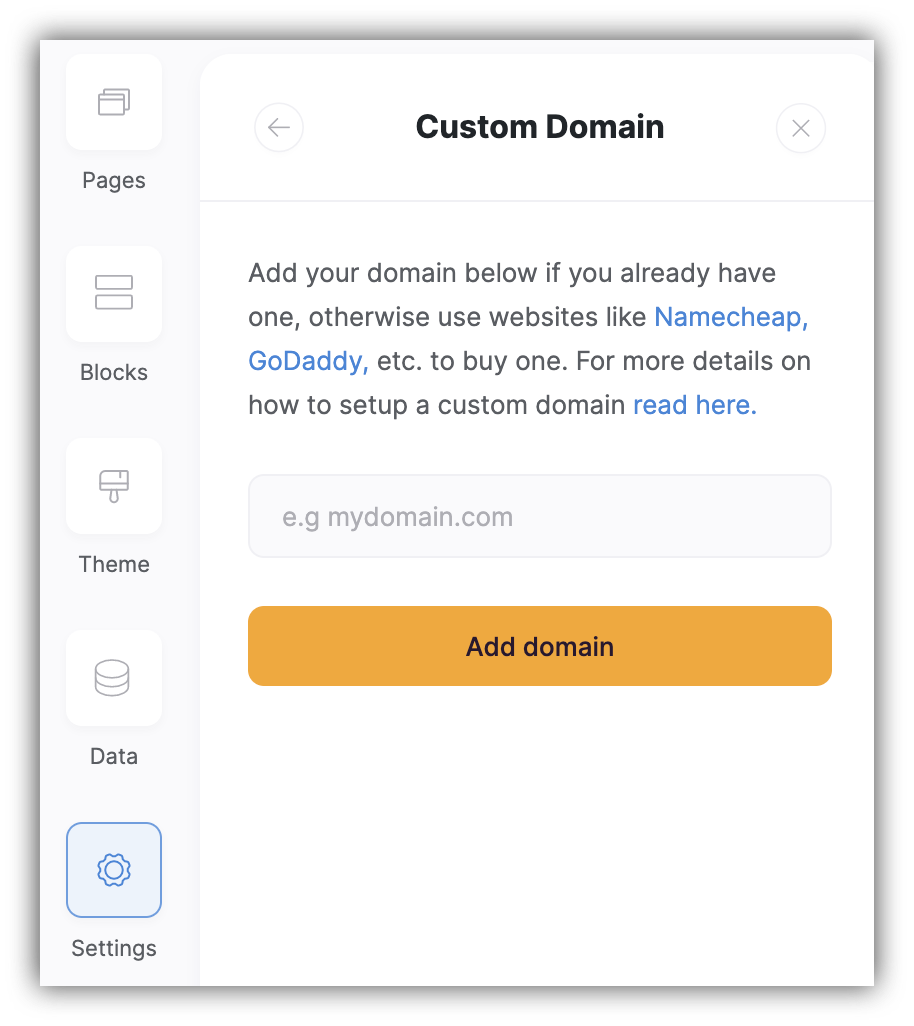
In your Softr application, go to the [Settings](/application-settings/n3K2UEfpC9BpHgakMzUU5Y/general-settings/7YdGy1J8X2tjJSv8BGvWQU) **=> Custom Domain** page and add your own custom domain in the following format **"yourdomain.com"**. It will also add the full domain **"[www.yourdomain.com](http://www.yourdomain.com)"** by default.
 ### ****2. Update the DNS****
Access your domain's DNS settings in your domain registrar's or DNS host's dashboard.
Every DNS host has its own way of updating DNS settings. Please, read the help documentation of your DNS host if you are not familiar with it yet. Also, check out our [FAQ](/faq/jUGRWwEkWw4akSEa5z5EDn/domain-setup/hZQgTBnTWKi7KEjurVHqgd) on domain setup.
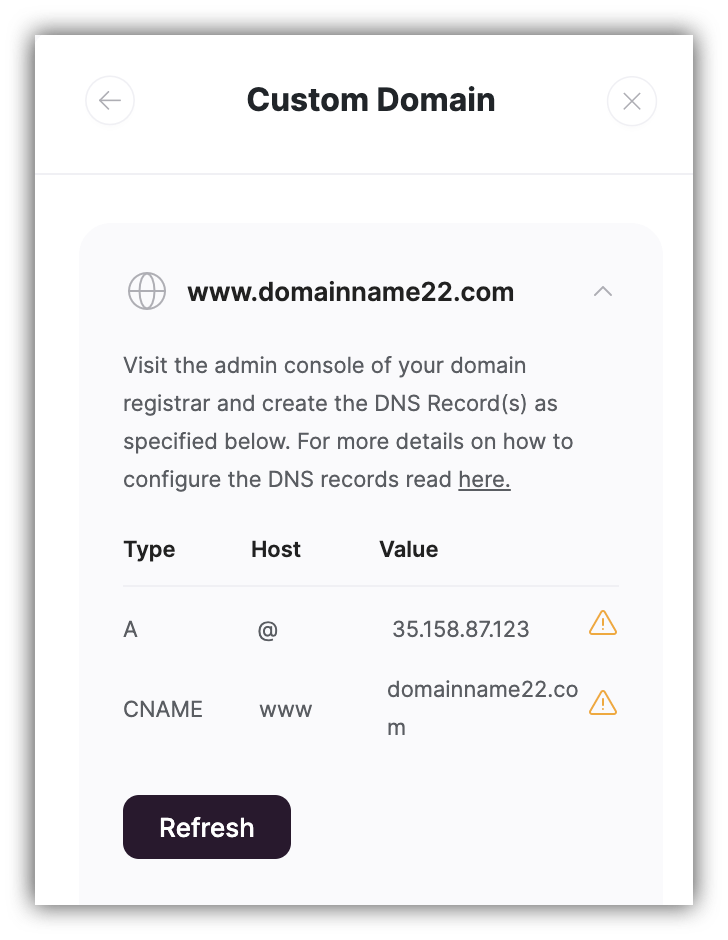
**Add an A record and CNAME**
You will need to create an **A record** and a **CNAME**
* For the **A record**, set the host to **@;**
* For the **CNAME**, set the host to **www ;**
* Input the IP address we've provided for you: “**35.158.87.123”**
Do not edit existing records in your DNS - you should **add new CNAME and A records** for your Softr app.
### ****2. Update the DNS****
Access your domain's DNS settings in your domain registrar's or DNS host's dashboard.
Every DNS host has its own way of updating DNS settings. Please, read the help documentation of your DNS host if you are not familiar with it yet. Also, check out our [FAQ](/faq/jUGRWwEkWw4akSEa5z5EDn/domain-setup/hZQgTBnTWKi7KEjurVHqgd) on domain setup.
**Add an A record and CNAME**
You will need to create an **A record** and a **CNAME**
* For the **A record**, set the host to **@;**
* For the **CNAME**, set the host to **www ;**
* Input the IP address we've provided for you: “**35.158.87.123”**
Do not edit existing records in your DNS - you should **add new CNAME and A records** for your Softr app.
 To verify that your DNS settings are correct, and that your domain is correctly pointing to Softr, **check the status** of your domain name in your DNS settings.
DNS changes may take a few minutes for your A name records to propagate everywhere. If you still run into any issues with your domain verification, reach out to your DNS provider to make sure the records are set correctly.
### **3. Publish your application to your custom domain**
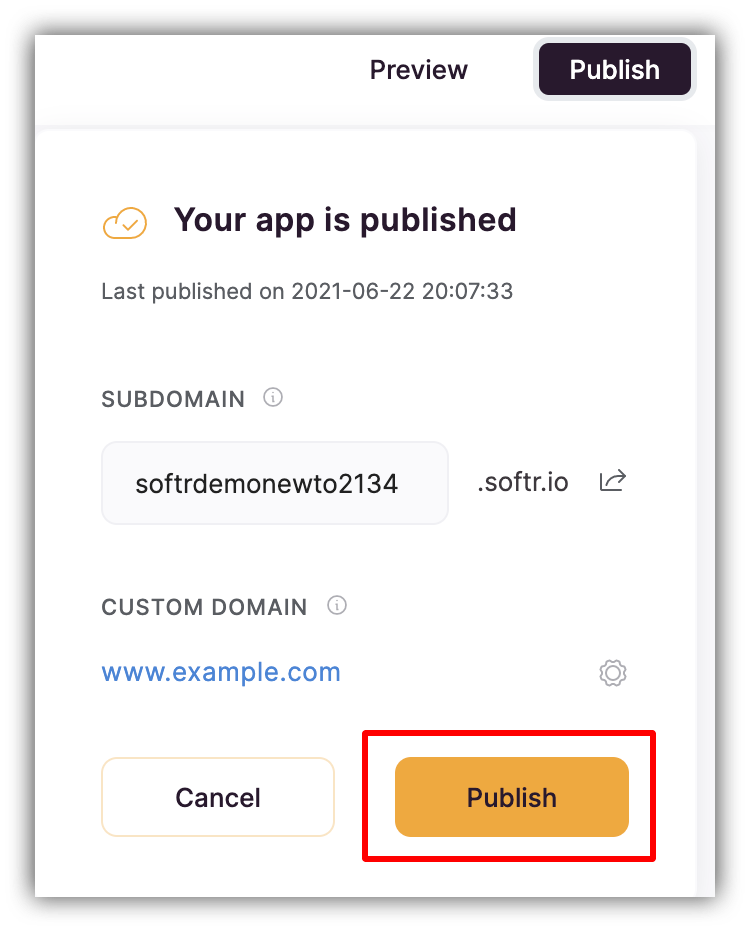
Now if you click on the Publish button within your Softr studio's top navigation bar, you should see your custom domain in the menu that opens. Clickthe **Publish** button, and you are almost done.
To verify that your DNS settings are correct, and that your domain is correctly pointing to Softr, **check the status** of your domain name in your DNS settings.
DNS changes may take a few minutes for your A name records to propagate everywhere. If you still run into any issues with your domain verification, reach out to your DNS provider to make sure the records are set correctly.
### **3. Publish your application to your custom domain**
Now if you click on the Publish button within your Softr studio's top navigation bar, you should see your custom domain in the menu that opens. Clickthe **Publish** button, and you are almost done.
 It may take **up to 48 hours** before changes are successfully made from your DNS host, so that you are able to open your application with your domain.
When the DNS records in your **Settings => Custom Domain** page show up as **Connected** in green color, your domain is functional.
## Adding a Custom Subdomain
In this guide, we'll show you how you can publish your application to your own custom **subdomain** (e.g. *myportal.example.com*).
### **1. Add a custom subdomain**
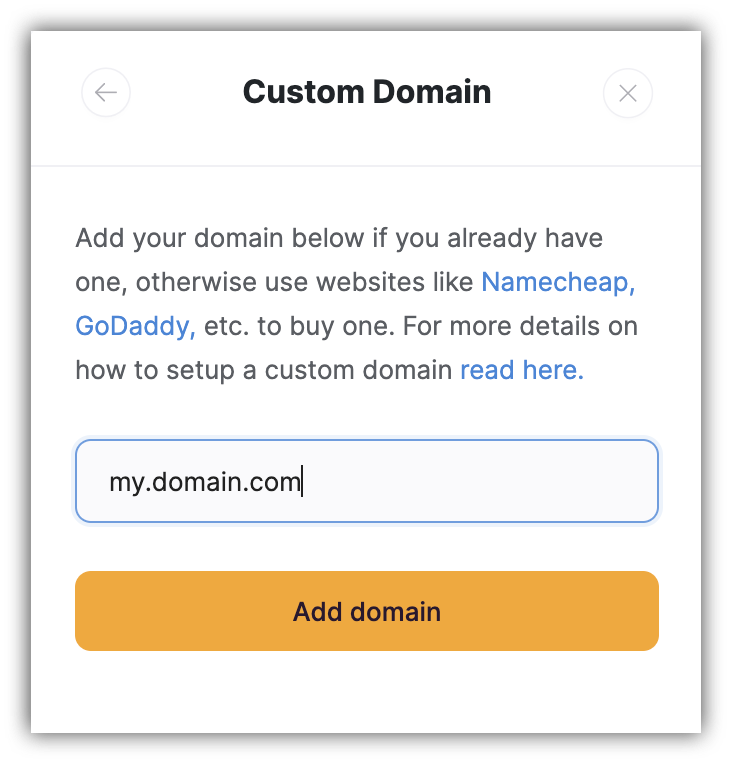
In your Softr application, go to the [Settings](/application-settings/n3K2UEfpC9BpHgakMzUU5Y/general-settings/7YdGy1J8X2tjJSv8BGvWQU) **=> Custom Domain** page and and add your own custom subdomain in the following format **"my.domain.com"**.
It may take **up to 48 hours** before changes are successfully made from your DNS host, so that you are able to open your application with your domain.
When the DNS records in your **Settings => Custom Domain** page show up as **Connected** in green color, your domain is functional.
## Adding a Custom Subdomain
In this guide, we'll show you how you can publish your application to your own custom **subdomain** (e.g. *myportal.example.com*).
### **1. Add a custom subdomain**
In your Softr application, go to the [Settings](/application-settings/n3K2UEfpC9BpHgakMzUU5Y/general-settings/7YdGy1J8X2tjJSv8BGvWQU) **=> Custom Domain** page and and add your own custom subdomain in the following format **"my.domain.com"**.
 If you already have a domain purchased from a provider, you can add as many subdomains as you like with that provider for free. You just need to add the DNS records on the provider side. Each custom subdomain still counts towards your custom domain plan limit in Softr.
Custom domain and extra custom domain slots depend on the subscription plan. See [plan comparison](https://www.softr.io/pricing).
### **2. Update the DNS**
Access your domain's DNS settings in your domain registrar's or DNS host's dashboard.
Every DNS host has its own way of updating DNS settings. Please, read the help documentation of your DNS host if you are not familiar with it yet. Also, check out our [FAQ](/faq/jUGRWwEkWw4akSEa5z5EDn/domain-setup/hZQgTBnTWKi7KEjurVHqgd) on domain setup.
**Add an A record**
You will need to create an **A record** as follows:
* For the **A record**, set the host to the subdomain part of the URL ("my" in our example)**;**
* Input the IP address we've provided for you: “**35.158.87.123”**
Do not edit existing records in your DNS - you should **add a new A record** for your Softr app.
If you already have a domain purchased from a provider, you can add as many subdomains as you like with that provider for free. You just need to add the DNS records on the provider side. Each custom subdomain still counts towards your custom domain plan limit in Softr.
Custom domain and extra custom domain slots depend on the subscription plan. See [plan comparison](https://www.softr.io/pricing).
### **2. Update the DNS**
Access your domain's DNS settings in your domain registrar's or DNS host's dashboard.
Every DNS host has its own way of updating DNS settings. Please, read the help documentation of your DNS host if you are not familiar with it yet. Also, check out our [FAQ](/faq/jUGRWwEkWw4akSEa5z5EDn/domain-setup/hZQgTBnTWKi7KEjurVHqgd) on domain setup.
**Add an A record**
You will need to create an **A record** as follows:
* For the **A record**, set the host to the subdomain part of the URL ("my" in our example)**;**
* Input the IP address we've provided for you: “**35.158.87.123”**
Do not edit existing records in your DNS - you should **add a new A record** for your Softr app.
 To verify that your DNS settings are correct, and that your subdomain is correctly pointing to Softr, **check the status** of your domain name in your DNS settings.
DNS changes may take a few minutes for your A name records to propagate everywhere. If you still run into any issues with your domain verification, reach out to your DNS provider to make sure the records are set correctly.
### **3. Publish your application to your custom subdomain**
Now, if you click on the **Publish** button within your Softr studio's top navigation bar, you should see your custom subdomain in the menu that opens. Clickthe **Publish** button, and you are almost done.
To verify that your DNS settings are correct, and that your subdomain is correctly pointing to Softr, **check the status** of your domain name in your DNS settings.
DNS changes may take a few minutes for your A name records to propagate everywhere. If you still run into any issues with your domain verification, reach out to your DNS provider to make sure the records are set correctly.
### **3. Publish your application to your custom subdomain**
Now, if you click on the **Publish** button within your Softr studio's top navigation bar, you should see your custom subdomain in the menu that opens. Clickthe **Publish** button, and you are almost done.
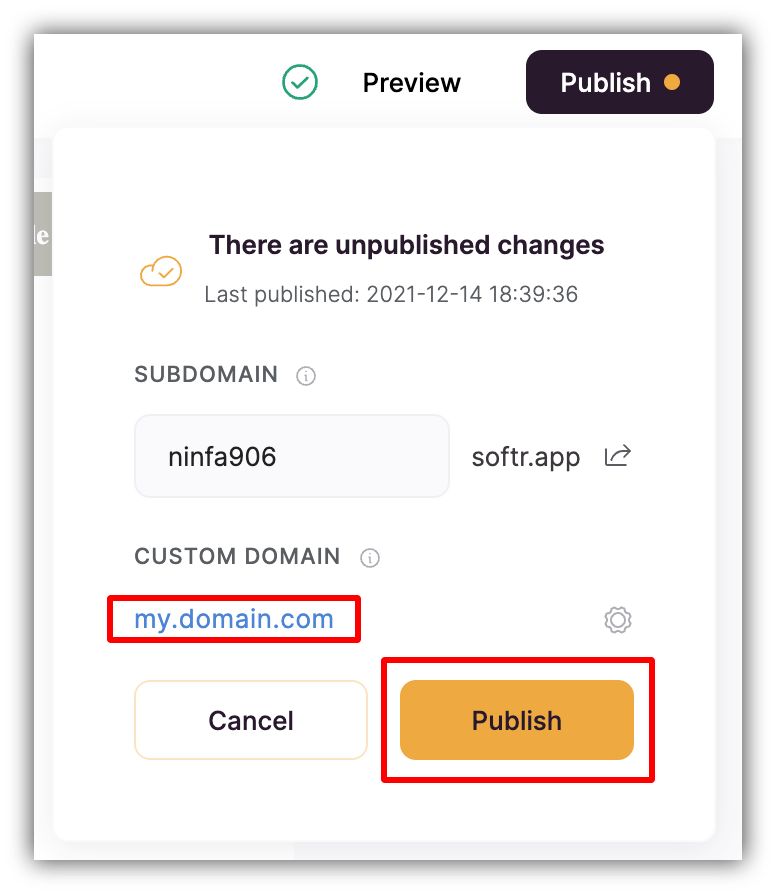 It may take **up to 48 hours** before changes are successfully made from your DNS host, so that you are able to open your application with your subdomain.
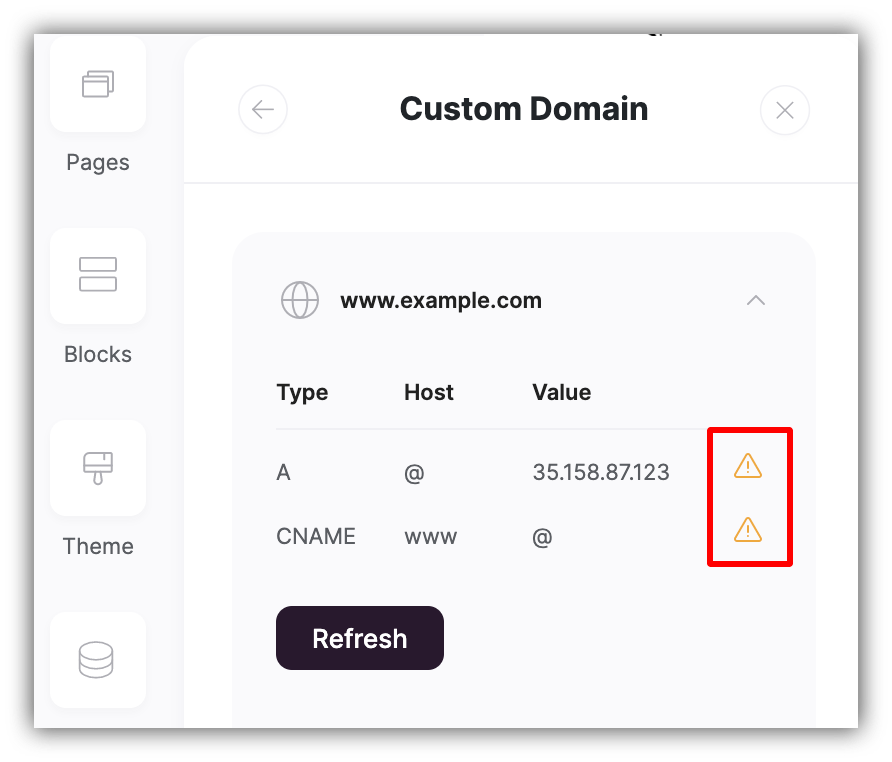
When the DNS records in your **Settings => Custom Domain** page show up as **Connected** in green color, your subdomain is functional.
If your subdomain is not working correctly after 48 hours, contact your domain provider’s support. If your DNS settings are correct and you are still experiencing issues with your published application, contact us and we'll assist.
It may take **up to 48 hours** before changes are successfully made from your DNS host, so that you are able to open your application with your subdomain.
When the DNS records in your **Settings => Custom Domain** page show up as **Connected** in green color, your subdomain is functional.
If your subdomain is not working correctly after 48 hours, contact your domain provider’s support. If your DNS settings are correct and you are still experiencing issues with your published application, contact us and we'll assist.
 **EXAMPLE:** Please, check out our example tutorial for a Namecheap subdomain setup [here](/publishing/9qTmU2Lj8Gnpr1Ue6dEAkX/tutorial-how-to-set-up-a-custom-subdomain-for-namecheap/3xKMZspFwCRukmmLYE649b).
## Troubleshooting when a domain does not work correctly
If your domain is not working correctly after 48 hours:
* **CNAME** should point to your custom domain, not \{domain}.softr.app
* If your domain registrar doesn’t allow for @ to be used in **A Record**, Leave A record value empty, and add **www** for **CNAME**
* SSL is being installed automatically once you point to the right domain **and** **[Publish the app](/publishing/9qTmU2Lj8Gnpr1Ue6dEAkX/publishing-your-softr-app/gRrb1u7eLmRTrXyg3UNGkQ)**.
If your DNS settings are correct and you are still experiencing issues with your published application, contact your domain provider’s support, or contact us and we'll assist.
**EXAMPLE:** Please, check out our example tutorial for a Namecheap subdomain setup [here](/publishing/9qTmU2Lj8Gnpr1Ue6dEAkX/tutorial-how-to-set-up-a-custom-subdomain-for-namecheap/3xKMZspFwCRukmmLYE649b).
## Troubleshooting when a domain does not work correctly
If your domain is not working correctly after 48 hours:
* **CNAME** should point to your custom domain, not \{domain}.softr.app
* If your domain registrar doesn’t allow for @ to be used in **A Record**, Leave A record value empty, and add **www** for **CNAME**
* SSL is being installed automatically once you point to the right domain **and** **[Publish the app](/publishing/9qTmU2Lj8Gnpr1Ue6dEAkX/publishing-your-softr-app/gRrb1u7eLmRTrXyg3UNGkQ)**.
If your DNS settings are correct and you are still experiencing issues with your published application, contact your domain provider’s support, or contact us and we'll assist.
 ## FAQ
Below are some common questions we get about custom domains. Click the toggle to reveal each answer.
If your website is website.com, the most common approach is to add a subdomain to Softr like portal.website.com or app.website.com. This ensures they share the same top-level domain, while having distinct URLs based on their purpose. You’ll begin to notice that many web apps you use on a daily basis do this as well.
If you have waited 24 hours and the connection you still cannot access the app, try these steps:
* Check the website URL in [https://dnschecker.org/](https://dnschecker.org/) to see any issues.
* Make sure you have the right DNS with the right IP address: **35.158.87.123**
* Try removing the domain from Softr and re-adding to re-initialize the SSL certificate
* Make sure the app is published
* Be sure to allow cookies for your site in your browser
No, subdomains and top-level domains are handled differently and are seen as separate sites by the DNS.
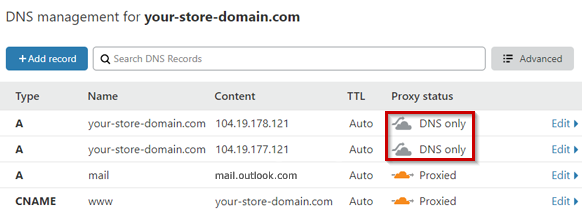
If you are using Cloudflare with Softr, please use **DNS Only** Records instead of **Proxied** ones. See the image below.
## FAQ
Below are some common questions we get about custom domains. Click the toggle to reveal each answer.
If your website is website.com, the most common approach is to add a subdomain to Softr like portal.website.com or app.website.com. This ensures they share the same top-level domain, while having distinct URLs based on their purpose. You’ll begin to notice that many web apps you use on a daily basis do this as well.
If you have waited 24 hours and the connection you still cannot access the app, try these steps:
* Check the website URL in [https://dnschecker.org/](https://dnschecker.org/) to see any issues.
* Make sure you have the right DNS with the right IP address: **35.158.87.123**
* Try removing the domain from Softr and re-adding to re-initialize the SSL certificate
* Make sure the app is published
* Be sure to allow cookies for your site in your browser
No, subdomains and top-level domains are handled differently and are seen as separate sites by the DNS.
If you are using Cloudflare with Softr, please use **DNS Only** Records instead of **Proxied** ones. See the image below.
 Softr provides DDOS protection built-in to our servers.
No, we do not currently offer self-hosting.
Softr provides DDOS protection built-in to our servers.
No, we do not currently offer self-hosting.